
Anonymizers
Anonymizers help you protect sensitive information in your LLM applications by automatically detecting and replacing personally identifiable information (PII) and other sensitive data before it's logged to Opik. This ensures compliance with privacy regulations and prevents accidental exposure of sensitive information in your trace data.
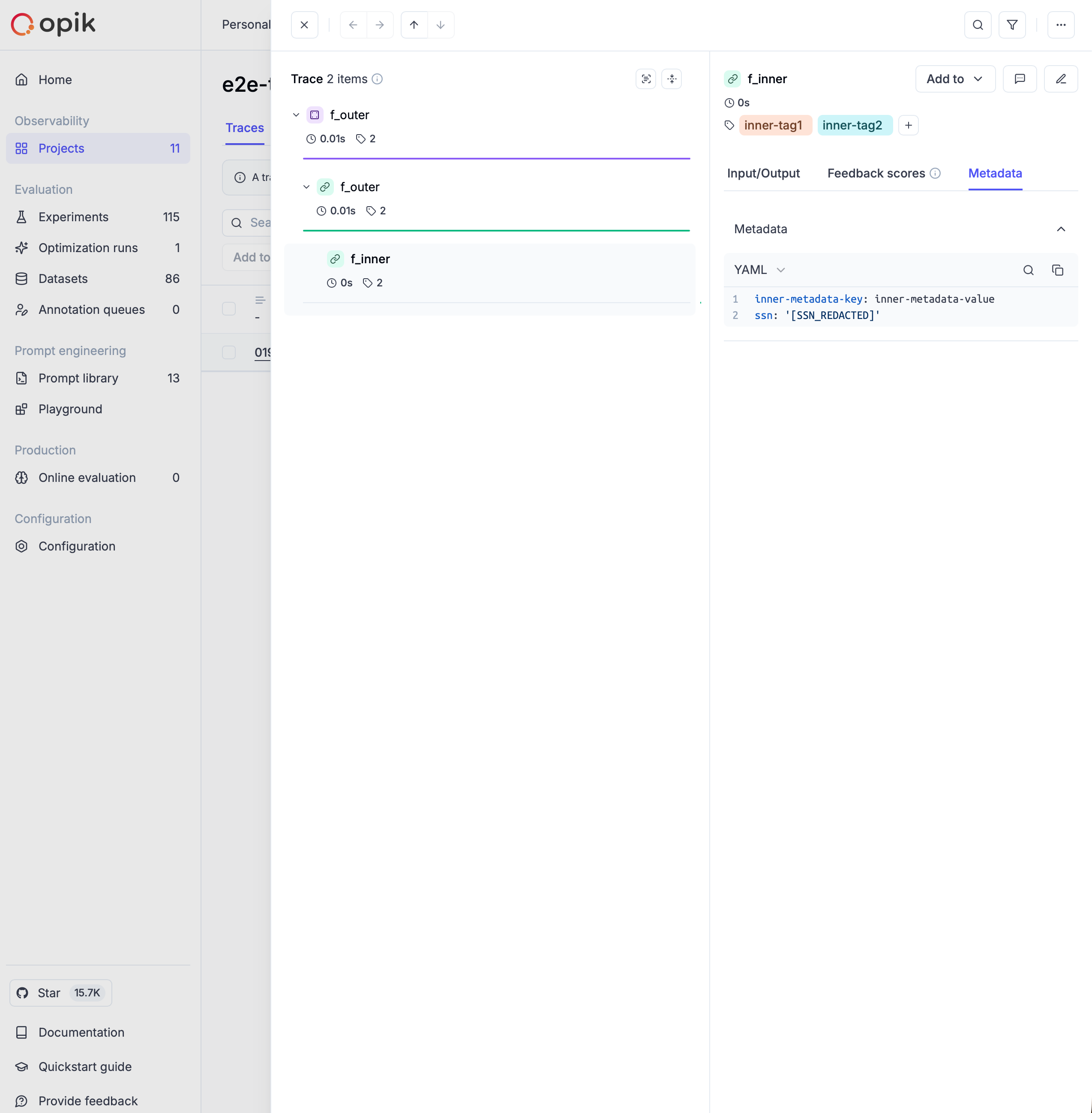
How it works
Section titled “How it works”Anonymizers work by processing all data that flows through Opik's tracing system - including inputs, outputs, and metadata - before it's stored or displayed. They apply a set of rules to detect and replace sensitive information with anonymized placeholders.
The anonymization happens automatically and transparently:
- Data Ingestion: When you log traces and spans to Opik
- Rule Application: Registered anonymizers scan the data using their configured rules
- Replacement: Sensitive information is replaced with anonymized placeholders
- Storage: Only the anonymized data is stored in Opik
Types of Anonymizers
Section titled “Types of Anonymizers”Rules-based Anonymizer
Section titled “Rules-based Anonymizer”The most common type of anonymizer uses pattern-matching rules to identify and replace sensitive information. Rules can be defined in several formats:
Regex Rules
Section titled “Regex Rules”Use regular expressions to match specific patterns:
import opik
from opik.anonymizer import create_anonymizer

# Dictionary format
email_rule = {"regex": r"\b[A-Za-z0-9._%+-]+@[A-Za-z0-9.-]+\.[A-Z|a-z]{2,}\b", "replace": "[EMAIL]"}

# Tuple format
phone_rule = (r"\b\d{3}-\d{3}-\d{4}\b", "[PHONE]")

# Create anonymizer with multiple rules
anonymizer = create_anonymizer([email_rule, phone_rule])

# Register globally
opik.hooks.add_anonymizer(anonymizer)
Function Rules
Section titled “Function Rules”Use custom Python functions for more complex anonymization logic:
import opik
from opik.anonymizer import create_anonymizer

def mask_api_keys(text: str) -> str:
    """Custom function to anonymize API keys"""
    import re
    # Match common API key patterns
    api_key_pattern = r'\b(sk-[a-zA-Z0-9]{32,}|pk_[a-zA-Z0-9]{24,})\b'
    return re.sub(api_key_pattern, '[API_KEY]', text)

def anonymize_with_hash(text: str) -> str:
    """Replace emails with consistent hashes for tracking without exposing PII"""
    import re
    import hashlib

    def hash_replace(match):
        email = match.group(0)
        hash_val = hashlib.md5(email.encode()).hexdigest()[:8]
        return f"[EMAIL_{hash_val}]"

    email_pattern = r'\b[A-Za-z0-9._%+-]+@[A-Za-z0-9.-]+\.[A-Z|a-z]{2,}\b'
    return re.sub(email_pattern, hash_replace, text)

# Create anonymizer with function rules
anonymizer = create_anonymizer([mask_api_keys, anonymize_with_hash])
opik.hooks.add_anonymizer(anonymizer)
Mixed Rules
Section titled “Mixed Rules”Combine different rule types for comprehensive anonymization:
import opik
import opik.hooks
from opik.anonymizer import create_anonymizer

# Mix of dictionary, tuple, and function rules
mixed_rules = [
    {"regex": r"\b\d{3}-\d{2}-\d{4}\b", "replace": "[SSN]"},  # Social Security Numbers
    (r"\b\d{4}[- ]?\d{4}[- ]?\d{4}[- ]?\d{4}\b", "[CARD]"),  # Credit Cards
    lambda text: text.replace("CONFIDENTIAL", "[REDACTED]"),  # Custom replacements
]

anonymizer = create_anonymizer(mixed_rules)
opik.hooks.add_anonymizer(anonymizer)
Custom Anonymizers
Section titled “Custom Anonymizers”For advanced use cases, create custom anonymizers by extending the Anonymizer base class.
Understanding Anonymizer Arguments
Section titled “Understanding Anonymizer Arguments”When implementing custom anonymizers, you need to implement the anonymize() method with the following signature:
def anonymize(self, data, **kwargs):
    # Your anonymization logic here
    return anonymized_data
The kwargs parameters:
The anonymize() method also receives additional context through **kwargs:
field_name: Indicates which field is being anonymized ("input","output","metadata", or nested field names in dots notation such as"metadata.email")object_type: The type of the object being processed ("span","trace")
When are kwargs available?
These kwargs are automatically passed by Opik's internal data processors when anonymizing trace and span data before sending it to the backend. This allows you to apply different anonymization strategies based on the field being processed.
Example: Field-specific anonymization
from opik.anonymizer import Anonymizer
import opik.hooks

class FieldAwareAnonymizer(Anonymizer):
    def anonymize(self, data, **kwargs):
        field_name = kwargs.get("field_name", "")

        # Only anonymize the output field, leave input as-is for debugging
        if field_name == "output" and isinstance(data, str):
            import re
            # More aggressive anonymization for outputs
            data = re.sub(r'\b[A-Za-z0-9._%+-]+@[A-Za-z0-9.-]+\.[A-Z|a-z]{2,}\b', '[EMAIL]', data)
            data = re.sub(r'\b\d{3}-\d{3}-\d{4}\b', '[PHONE]', data)
        elif field_name == "metadata" and isinstance(data, dict):
            # Remove specific metadata fields entirely
            sensitive_keys = ["user_id", "session_token", "api_key"]
            for key in sensitive_keys:
                if key in data:
                    data[key] = "[REDACTED]"

        return data

# Register the field-aware anonymizer
opik.hooks.add_anonymizer(FieldAwareAnonymizer())Example: Anonymization of nested data structures
Also, you can extend the RecursiveAnonymizer base class to work with nested data structures.
This allows you to apply the same anonymization logic to all nested fields. In this case you
need to implement the anonymize_text() method instead of anonymize().
from typing import Any, Optional

from opik.anonymizer import RecursiveAnonymizer
import opik.hooks

class SSNAnonymizer(RecursiveAnonymizer):
    def anonymize_text(self, data: str, field_name: Optional[str] = None, **kwargs: Any) -> str:
        if field_name == "metadata.ssn":
            return "[SSN_REMOVED]"

        return data
Advanced Custom Anonymizer Example
Section titled “Advanced Custom Anonymizer Example”import opik
import opik.hooks
from opik.anonymizer import Anonymizer
class AdvancedPIIAnonymizer(Anonymizer):
def anonymize(self, data, **kwargs):
"""Custom anonymizer with advanced PII detection and removal."""
field_name = kwargs.get("field_name")
object_type = kwargs.get("object_type")
# Handle different data types
if isinstance(data, dict):
# Remove sensitive keys entirely
if "api_key" in data:
del data["api_key"]
if "password" in data:
del data["password"]
# Anonymize specific fields
for key, value in data.items():
if key.lower() in ["email", "user_email"]:
data[key] = "[EMAIL_REDACTED]"
elif key.lower() in ["phone", "telephone", "mobile"]:
data[key] = "[PHONE_REDACTED]"
elif isinstance(data, str):
# Apply string-based anonymization
import re
# Names (simple heuristic)
data = re.sub(r'\b[A-Z][a-z]+ [A-Z][a-z]+\b', '[NAME]', data)
# Addresses
data = re.sub(r'\d+\s+\w+\s+(Street|St|Avenue|Ave|Road|Rd|Drive|Dr)\b', '[ADDRESS]', data)
return data
# Register the custom anonymizer
opik.hooks.add_anonymizer(AdvancedPIIAnonymizer())Usage Examples
Section titled “Usage Examples”Basic Setup
Section titled “Basic Setup”Here's a complete example showing how to set up anonymization for a simple LLM application:
import opik
import opik.hooks
from opik.anonymizer import create_anonymizer

# Define PII anonymization rules
pii_rules = [
    # Email addresses
    {"regex": r"\b[A-Za-z0-9._%+-]+@[A-Za-z0-9.-]+\.[A-Z|a-z]{2,}\b", "replace": "[EMAIL]"},
    # Phone numbers (US format)
    {"regex": r"\b\d{3}-\d{3}-\d{4}\b", "replace": "[PHONE]"},
    # Social Security Numbers
    {"regex": r"\b\d{3}-\d{2}-\d{4}\b", "replace": "[SSN]"},
    # Credit card numbers
    {"regex": r"\b\d{4}[- ]?\d{4}[- ]?\d{4}[- ]?\d{4}\b", "replace": "[CARD]"},
]

# Create and register anonymizer
anonymizer = create_anonymizer(pii_rules)
opik.hooks.add_anonymizer(anonymizer)

# Now all traced functions will automatically anonymize PII
@opik.track
def process_customer_data(customer_info):
    """This function processes customer data with automatic PII anonymization"""
    # The input and output will be automatically anonymized
    return f"Processed customer: {customer_info}"

# Example usage - PII will be automatically anonymized in traces
result = process_customer_data("John Doe, email: john@example.com, phone: 555-123-4567")
Advanced Configuration
Section titled “Advanced Configuration”For more sophisticated anonymization scenarios:
import opik
import opik.hooks
from opik.anonymizer import create_anonymizer, Anonymizer

class ComplianceAnonymizer(Anonymizer):
    """Enterprise-grade anonymizer for compliance requirements"""

    def __init__(self, compliance_level="standard"):
        self.compliance_level = compliance_level
        self.sensitive_fields = {
            "standard": ["email", "phone", "ssn"],
            "strict": ["email", "phone", "ssn", "name", "address", "dob"],
            "minimal": ["ssn", "password"]
        }

    def anonymize(self, data, **kwargs):
        field_name = kwargs.get("field_name", "")

        if isinstance(data, dict):
            # Process dictionary fields
            for key, value in list(data.items()):
                if key.lower() in self.sensitive_fields[self.compliance_level]:
                    data[key] = f"[{key.upper()}_REDACTED]"

        elif isinstance(data, str):
            # Apply string-level anonymization based on the compliance level
            if self.compliance_level == "strict":
                # More aggressive anonymization
                import re
                data = re.sub(r'\b[A-Z][a-z]+ [A-Z][a-z]+\b', '[NAME]', data)
                data = re.sub(r'\b\d{1,4}\s+\w+\s+\w+\b', '[ADDRESS]', data)

        return data

# Set up multi-layer anonymization
opik.hooks.clear_anonymizers()  # Clear any existing anonymizers

# Layer 1: Basic PII patterns
basic_rules = [
    (r"\b[A-Za-z0-9._%+-]+@[A-Za-z0-9.-]+\.[A-Z|a-z]{2,}\b", "[EMAIL]"),
    (r"\b\d{3}-\d{3}-\d{4}\b", "[PHONE]"),
]
opik.hooks.add_anonymizer(create_anonymizer(basic_rules))

# Layer 2: Compliance-specific anonymization
opik.hooks.add_anonymizer(ComplianceAnonymizer(compliance_level="standard"))

# Layer 3: Custom business logic
def remove_internal_identifiers(text):
    """Remove company-specific internal identifiers"""
    import re
    return re.sub(r'\bEMP-\d{6}\b', '[EMPLOYEE_ID]', text)

opik.hooks.add_anonymizer(create_anonymizer(remove_internal_identifiers))
Using third-party PII libraries
Section titled “Using third-party PII libraries”In addition to regex and custom Python functions, you can reuse existing PII detection / redaction tools such as Microsoft Presidio or cloud APIs (AWS Comprehend, Google Cloud DLP, Azure AI Language). These tools can be wrapped inside an Opik anonymizer so that all trace data is pre-redacted before it’s logged. You typically integrate third-party tools in one of two ways:
- Local open-source libraries running inside your app or self-hosted Opik deployment
(e.g. Microsoft Presidio,
scrubadub). - Managed cloud services called via their SDKs from your anonymizer (e.g. AWS Comprehend PII, Google Cloud DLP, Azure AI Language PII).
Example: Microsoft Presidio (open source, runs locally)
Section titled “Example: Microsoft Presidio (open source, runs locally)”First, install Presidio in your environment:
pip install presidio-analyzer presidio-anonymizerThen create an Anonymizer that delegates to Presidio:
from typing import Any

import opik.hooks
from opik.anonymizer import RecursiveAnonymizer

from presidio_analyzer import AnalyzerEngine
from presidio_anonymizer import AnonymizerEngine
from presidio_anonymizer.entities import OperatorConfig

class PresidioPIIAnonymizer(RecursiveAnonymizer):
    """Use Microsoft Presidio to detect and anonymize PII in text.
    This anonymizer is a simple wrapper around Presidio's built-in anonymizer engine.
    It extends the RecursiveAnonymizer base class to support nested data structures.
    """
    def __init__(self, language: str="en",  max_depth: int=10):
        super().__init__(max_depth=max_depth)
        self.language = language
        self.analyzer = AnalyzerEngine()
        self.anonymizer = AnonymizerEngine()

    def anonymize_text(self, data: str, **kwargs: Any) -> str:
        # 1) Detect PII entities in the text
        results = self.analyzer.analyze(
            text=data,
            language=self.language,
            entities=None,  # detect all supported entities
        )
        if not results:
            return data

        # 2) Apply Presidio anonymization
        operators = {
            "DEFAULT": OperatorConfig("replace", {"new_value": "[PII]"}),
            # You can customize per entity type if needed, for example:
            # "PHONE_NUMBER": OperatorConfig("mask", {"masking_char": "*", "chars_to_mask": 8}),
        }
        anon_result = self.anonymizer.anonymize(
            text=data,
            analyzer_results=results,
            operators=operators,
        )
        return anon_result.text

# Register the Presidio-based anonymizer globally
opik.hooks.add_anonymizer(PresidioPIIAnonymizer())Integration with Frameworks
Section titled “Integration with Frameworks”Anonymizers work seamlessly with all Opik integrations:
OpenAI Integration
Section titled “OpenAI Integration”import opik
import opik.hooks
from opik.anonymizer import create_anonymizer
from opik.integrations.openai import track_openai
import openai
# Set up anonymization
pii_rules = [
{"regex": r"\b[A-Za-z0-9._%+-]+@[A-Za-z0-9.-]+\.[A-Z|a-z]{2,}\b", "replace": "[EMAIL]"},
{"regex": r"\b\d{3}-\d{3}-\d{4}\b", "replace": "[PHONE]"},
]
opik.hooks.add_anonymizer(create_anonymizer(pii_rules))
# Enable OpenAI tracking with automatic anonymization
client = track_openai(openai.OpenAI())
# PII in prompts will be automatically anonymized in traces
response = client.chat.completions.create(
model="gpt-3.5-turbo",
messages=[{
"role": "user",
"content": "Help me draft an email to john.doe@company.com about his phone number 555-123-4567"
}]
)LangChain Integration
Section titled “LangChain Integration”import opik
import opik.hooks
from opik.anonymizer import create_anonymizer
from opik.integrations.langchain import OpikTracer
from langchain_openai import ChatOpenAI
from langchain.schema import HumanMessage
# Configure anonymization - mix regex and callable function
def mask_credit_cards(text: str) -> str:
"""Partial masking: show first 4 and last 4 digits, mask the middle"""
import re
def partial_mask(match):
card = match.group(0).replace('-', '').replace(' ', '')
if len(card) >= 8:
return card[:4] + '*' * (len(card) - 8) + card[-4:]
return '[CARD]'
return re.sub(r'\b\d{4}[- ]?\d{4}[- ]?\d{4}[- ]?\d{4}\b', partial_mask, text)
anonymizer_rules = [
# Email pattern (regex tuple)
(r"\b[A-Za-z0-9._%+-]+@[A-Za-z0-9.-]+\.[A-Z|a-z]{2,}\b", "[EMAIL]"),
# Callable function for smart masking
mask_credit_cards,
]
opik.hooks.add_anonymizer(create_anonymizer(anonymizer_rules))
# Set up LangChain with Opik tracing
llm = ChatOpenAI(callbacks=[OpikTracer()])
# All inputs and outputs will be automatically anonymized
messages = [HumanMessage(content="Contact sarah@example.com about card 4532-1234-5678-9010")]
result = llm.invoke(messages)Configuration Options
Section titled “Configuration Options”Max Depth
Section titled “Max Depth”Control how deeply nested data structures are processed:
from opik.anonymizer import create_anonymizer

rules = [{"regex": r"\b\d{3}-\d{3}-\d{4}\b", "replace": "[PHONE]"}]

# Default max_depth is 10
anonymizer = create_anonymizer(rules, max_depth=5)
Multiple Anonymizers
Section titled “Multiple Anonymizers”Register multiple anonymizers that will be applied in sequence:
import opik
import opik.hooks
from opik.anonymizer import create_anonymizer

# Clear existing anonymizers
opik.hooks.clear_anonymizers()

# Add multiple anonymizers in order
opik.hooks.add_anonymizer(create_anonymizer([
    {"regex": r"\b[A-Za-z0-9._%+-]+@[A-Za-z0-9.-]+\.[A-Z|a-z]{2,}\b", "replace": "[EMAIL]"}
]))

opik.hooks.add_anonymizer(create_anonymizer([
    {"regex": r"\b\d{3}-\d{3}-\d{4}\b", "replace": "[PHONE]"}
]))

# Check if any anonymizers are registered
if opik.hooks.has_anonymizers():
    print(f"Active anonymizers: {len(opik.hooks.get_anonymizers())}")
Best Practices
Section titled “Best Practices”Rule Ordering
Section titled “Rule Ordering”Rules are applied in the order they're defined. More specific patterns should come before general ones:
rules = [
    # Specific: Credit cards (more specific pattern first)
    {"regex": r"\b4\d{3}[- ]?\d{4}[- ]?\d{4}[- ]?\d{4}\b", "replace": "[VISA_CARD]"},
    # General: Any credit card
    {"regex": r"\b\d{4}[- ]?\d{4}[- ]?\d{4}[- ]?\d{4}\b", "replace": "[CARD]"},
    # General: Any number sequence
    {"regex": r"\b\d{4,}\b", "replace": "[NUMBER]"},
]
Performance Considerations
Section titled “Performance Considerations”- Use precompiled regex patterns for improved performance on large datasets when implementing custom anonymization functions. Note: Opik's
RegexRuleautomatically compiles patterns when the rule is created. - Keep the number of rules reasonable to avoid performance impacts
- Consider using more specific patterns to reduce false positives
import re
from opik.anonymizer import create_anonymizer

# Pre-compile regex for better performance
EMAIL_PATTERN = re.compile(r"\b[A-Za-z0-9._%+-]+@[A-Za-z0-9.-]+\.[A-Z|a-z]{2,}\b")

def efficient_email_anonymizer(text):
    return EMAIL_PATTERN.sub("[EMAIL]", text)

anonymizer = create_anonymizer(efficient_email_anonymizer)
Testing Anonymizers
Section titled “Testing Anonymizers”Always test your anonymization rules to ensure they work correctly:
from opik.anonymizer import create_anonymizer

# Define your rules
rules = [
    {"regex": r"\b[A-Za-z0-9._%+-]+@[A-Za-z0-9.-]+\.[A-Z|a-z]{2,}\b", "replace": "[EMAIL]"},
    {"regex": r"\b\d{3}-\d{3}-\d{4}\b", "replace": "[PHONE]"},
]

anonymizer = create_anonymizer(rules)

# Test with sample data
test_data = "Contact John at john.doe@company.com or call 555-123-4567"
anonymized = anonymizer.anonymize(test_data)
print(anonymized)  # Should output: "Contact John at [EMAIL] or call [PHONE]"

# Test with nested data
test_nested = {
    "user": {
        "email": "user@example.com",
        "phone": "555-987-6543",
        "notes": "Called regarding john@company.com"
    }
}
anonymized_nested = anonymizer.anonymize(test_nested)
print(anonymized_nested)
Troubleshooting
Section titled “Troubleshooting”Common Issues
Section titled “Common Issues”Anonymizer not working:
- Ensure the anonymizer is registered with
opik.hooks.add_anonymizer() - Check that your patterns are correct using a regex tester
- Verify that
opik.flush_tracker()is called if needed
Performance issues:
- Reduce the complexity of regex patterns
- Limit the number of registered anonymizers
- Consider using more specific patterns to reduce processing overhead
False positives:
- Make your regex patterns more specific
- Test thoroughly with representative data
- Consider using negative lookbehind/lookahead assertions
Security Considerations
Section titled “Security Considerations”- Test thoroughly: Always test anonymization rules with representative data
- Regular updates: Review and update patterns as your application evolves
- Compliance: Ensure your anonymization approach meets regulatory requirements
- Backup strategy: Consider how to handle cases where anonymization fails
- Access control: Limit access to original data and anonymization rules