
Evaluate LLM Applications with Ragas Metrics in Opik
The Opik SDK provides a simple way to integrate with Ragas, a framework for evaluating RAG systems.
There are two main ways to use Ragas with Opik:
- Using Ragas to score traces or spans.
- Using Ragas to evaluate a RAG pipeline.
Account Setup
Section titled “Account Setup”Comet provides a hosted version of the Opik platform, simply create an account and grab your API Key.
You can also run the Opik platform locally, see the installation guide for more information.
Getting Started
Section titled “Getting Started”Installation
Section titled “Installation”You will first need to install the opik and ragas packages:
pip install opik ragasConfiguring Opik
Section titled “Configuring Opik”Configure the Opik Python SDK for your deployment type. See the Python SDK Configuration guide for detailed instructions on:
- CLI configuration:
opik configure - Code configuration:
opik.configure() - Self-hosted vs Cloud vs Enterprise setup
- Configuration files and environment variables
Configuring Ragas
Section titled “Configuring Ragas”In order to use Ragas, you will need to configure your LLM provider API keys. For this example, we'll use OpenAI. You can find or create your API keys in these pages:
You can set them as environment variables:
export OPENAI_API_KEY="YOUR_API_KEY"Or set them programmatically:
import os
import getpass

if "OPENAI_API_KEY" not in os.environ:
    os.environ["OPENAI_API_KEY"] = getpass.getpass("Enter your OpenAI API key: ")
Using Ragas to score traces or spans
Section titled “Using Ragas to score traces or spans”Ragas provides a set of metrics that can be used to evaluate the quality of a RAG pipeline, a full list of the supported metrics can be found in the Ragas documentation.
You can use the RagasMetricWrapper to easily integrate Ragas metrics with Opik tracking:
# Import the required dependencies
from ragas.metrics import AnswerRelevancy
from langchain_openai.chat_models import ChatOpenAI
from langchain_openai.embeddings import OpenAIEmbeddings
from ragas.llms import LangchainLLMWrapper
from ragas.embeddings import LangchainEmbeddingsWrapper
from opik.evaluation.metrics import RagasMetricWrapper

# Initialize the Ragas metric
llm = LangchainLLMWrapper(ChatOpenAI())
emb = LangchainEmbeddingsWrapper(OpenAIEmbeddings())
ragas_answer_relevancy = AnswerRelevancy(llm=llm, embeddings=emb)

# Wrap the Ragas metric with RagasMetricWrapper for Opik integration
answer_relevancy_metric = RagasMetricWrapper(
    ragas_answer_relevancy,
    track=True  # This enables automatic tracing in Opik
)
Once the metric wrapper is set up, you can use it to score traces or spans:
from opik import track
from opik.opik_context import update_current_trace

@track
def retrieve_contexts(question):
    # Define the retrieval function, in this case we will hard code the contexts
    return ["Paris is the capital of France.", "Paris is in France."]

@track
def answer_question(question, contexts):
    # Define the answer function, in this case we will hard code the answer
    return "Paris"

@track
def rag_pipeline(question):
    # Define the pipeline
    contexts = retrieve_contexts(question)
    answer = answer_question(question, contexts)

    # Score the pipeline using the RagasMetricWrapper
    score_result = answer_relevancy_metric.score(
        user_input=question,
        response=answer,
        retrieved_contexts=contexts
    )

    # Add the score to the current trace
    update_current_trace(
        feedback_scores=[{"name": score_result.name, "value": score_result.value}]
    )

    return answer

print(rag_pipeline("What is the capital of France?"))
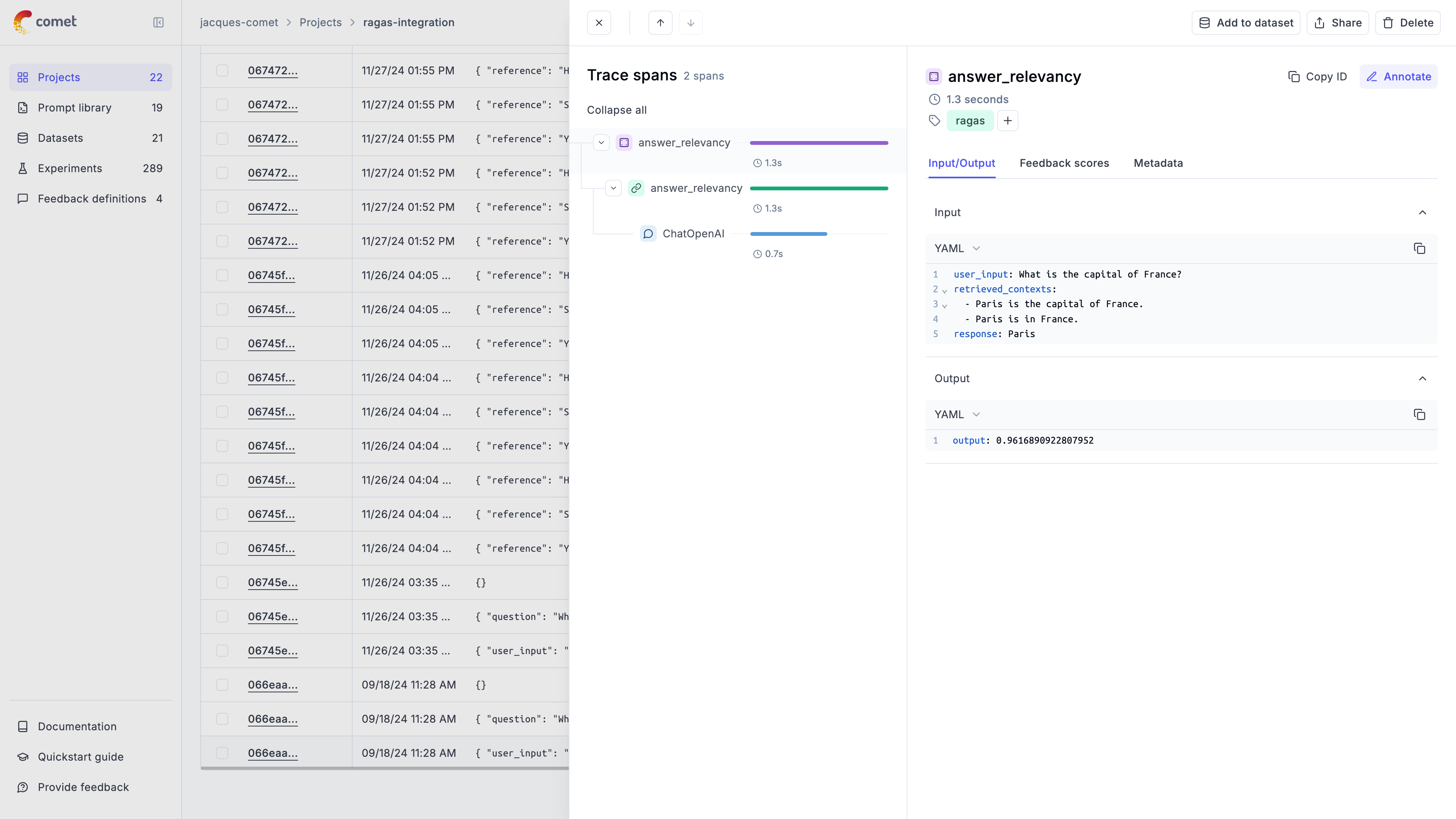
In the Opik UI, you will be able to see the full trace including the score calculation:
Comprehensive Example: Dataset Evaluation
Section titled “Comprehensive Example: Dataset Evaluation”For more advanced use cases, you can evaluate entire datasets using Ragas metrics with the Opik evaluation platform:
1. Create a Dataset
Section titled “1. Create a Dataset”from datasets import load_dataset
import opik
opik_client = opik.Opik()
# Create a small dataset
fiqa_eval = load_dataset("explodinggradients/fiqa", "ragas_eval")
# Reformat the dataset to match the schema expected by the Ragas evaluate function
hf_dataset = fiqa_eval["baseline"].select(range(3))
dataset_items = hf_dataset.map(
lambda x: {
"user_input": x["question"],
"reference": x["ground_truths"][0],
"retrieved_contexts": x["contexts"],
}
)
dataset = opik_client.get_or_create_dataset("ragas-demo-dataset", project_name="my-project")
dataset.insert(dataset_items)2. Define Evaluation Task
Section titled “2. Define Evaluation Task”# Create an evaluation task
def evaluation_task(x):
return {
"user_input": x["question"],
"response": x["answer"],
"retrieved_contexts": x["contexts"],
}3. Run Evaluation
Section titled “3. Run Evaluation”# Use the RagasMetricWrapper directly with Opik's evaluate function
opik.evaluation.evaluate(
dataset,
evaluation_task,
scoring_metrics=[answer_relevancy_metric],
task_threads=1,
)4. Alternative: Using Ragas Native Evaluation
Section titled “4. Alternative: Using Ragas Native Evaluation”You can also use Ragas' native evaluation function with Opik tracing:
from datasets import load_dataset
from opik.integrations.langchain import OpikTracer
from ragas.metrics import context_precision, answer_relevancy, faithfulness
from ragas import evaluate

fiqa_eval = load_dataset("explodinggradients/fiqa", "ragas_eval")

# Reformat the dataset to match the schema expected by the Ragas evaluate function
dataset = fiqa_eval["baseline"].select(range(3))

dataset = dataset.map(
    lambda x: {
        "user_input": x["question"],
        "reference": x["ground_truths"][0],
        "retrieved_contexts": x["contexts"],
    }
)

opik_tracer_eval = OpikTracer(tags=["ragas_eval"], metadata={"evaluation_run": True})

result = evaluate(
    dataset,
    metrics=[context_precision, faithfulness, answer_relevancy],
    callbacks=[opik_tracer_eval],
)

print(result)
Using Ragas metrics to evaluate a RAG pipeline
Section titled “Using Ragas metrics to evaluate a RAG pipeline”The RagasMetricWrapper can also be used directly within the Opik evaluation platform. This approach is much simpler than creating custom wrappers:
1. Define the Ragas metric
Section titled “1. Define the Ragas metric”We will start by defining the Ragas metric, in this example we will use AnswerRelevancy:
from ragas.metrics import AnswerRelevancy
from langchain_openai.chat_models import ChatOpenAI
from langchain_openai.embeddings import OpenAIEmbeddings
from ragas.llms import LangchainLLMWrapper
from ragas.embeddings import LangchainEmbeddingsWrapper
from opik.evaluation.metrics import RagasMetricWrapper

# Initialize the Ragas metric
llm = LangchainLLMWrapper(ChatOpenAI())
emb = LangchainEmbeddingsWrapper(OpenAIEmbeddings())

ragas_answer_relevancy = AnswerRelevancy(llm=llm, embeddings=emb)
2. Create the metric wrapper
Section titled “2. Create the metric wrapper”Simply wrap the Ragas metric with RagasMetricWrapper:
# Create the answer relevancy scoring metric
answer_relevancy = RagasMetricWrapper(
    ragas_answer_relevancy,
    track=True  # Enable tracing for the metric computation
)3. Use the metric wrapper within the Opik evaluation platform
Section titled “3. Use the metric wrapper within the Opik evaluation platform”You can now use the metric wrapper directly within the Opik evaluation platform:
from opik.evaluation import evaluate

evaluation_task = evaluate(
    dataset=dataset,
    task=evaluation_task,
    scoring_metrics=[answer_relevancy],
    nb_samples=10,
    project_name="my-project",
)
The RagasMetricWrapper automatically handles:
- Field mapping between Opik and Ragas (e.g.,
input→user_input,output→response) - Async execution of Ragas metrics
- Integration with Opik's tracing system when
track=True - Proper error handling for missing required fields