
Observability for BeeAI (TypeScript) with Opik
BeeAI is an agent framework designed to simplify the development of AI agents with a focus on simplicity and performance. It provides a clean API for building agents with built-in support for tool usage, conversation management, and extensible architecture.
BeeAI's primary advantage is its lightweight design that makes it easy to create and deploy AI agents without unnecessary complexity, while maintaining powerful capabilities for production use.
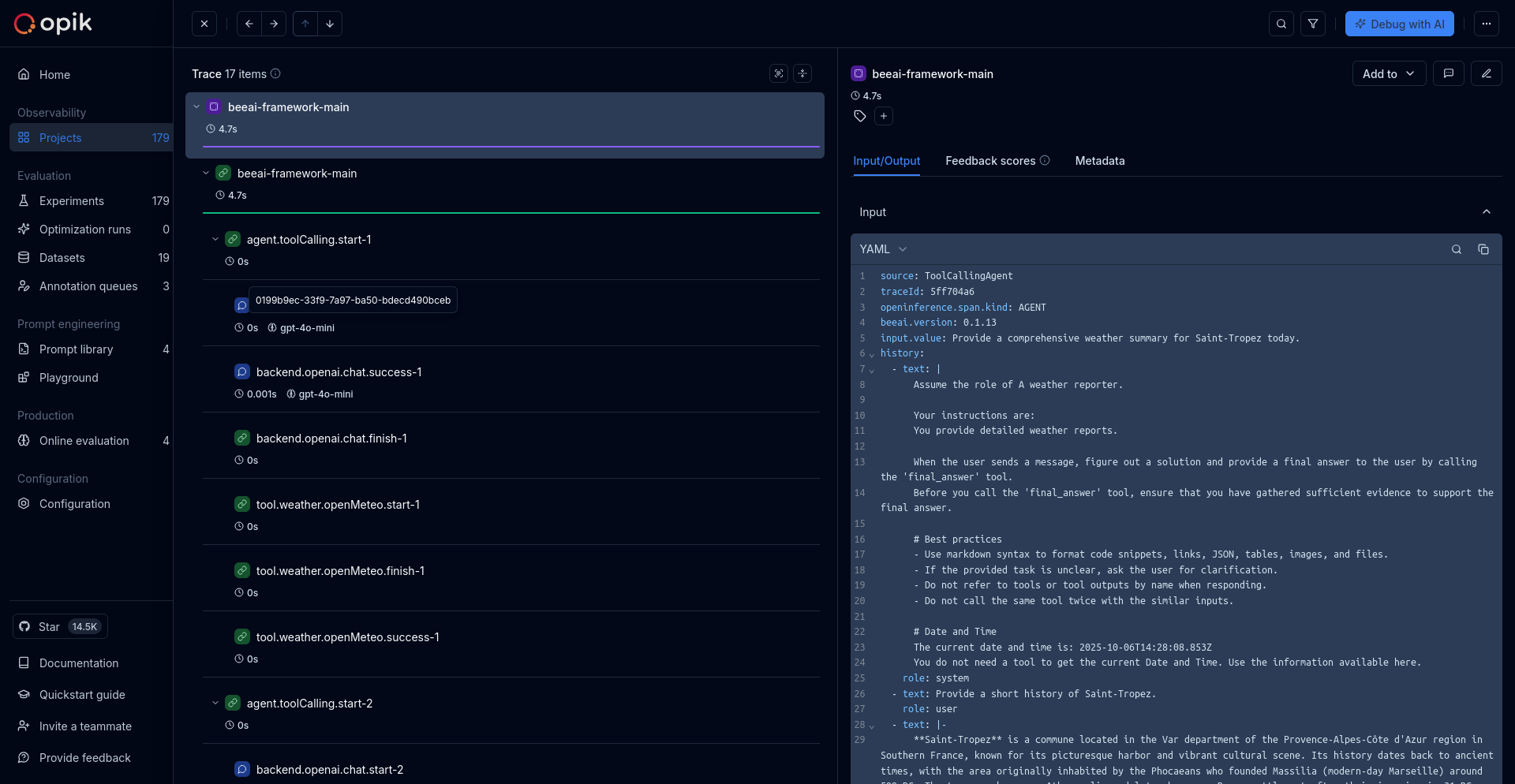
Getting started
Section titled “Getting started”To use the BeeAI integration with Opik, you will need to have BeeAI and the required OpenTelemetry packages installed.
Installation
Section titled “Installation”Option 1: Using npm
Section titled “Option 1: Using npm”npm install beeai-framework@0.1.13 @ai-sdk/openai @arizeai/openinference-instrumentation-beeai @opentelemetry/sdk-node dotenvOption 2: Using yarn
Section titled “Option 2: Using yarn”yarn add beeai-framework@0.1.13 @ai-sdk/openai @arizeai/openinference-instrumentation-beeai @opentelemetry/sdk-node dotenvRequirements
Section titled “Requirements”- Node.js ≥ 18
- BeeAI Framework (
beeai-framework) - OpenInference Instrumentation for BeeAI (
@arizeai/openinference-instrumentation-beeai) - OpenTelemetry SDK for Node.js (
@opentelemetry/sdk-node)
Environment configuration
Section titled “Environment configuration”Configure your environment variables based on your Opik deployment:
Intent: Route BeeAI OpenInference spans to Opik through OTLP. No breaking changes: existing BeeAI setups continue to work; these settings are only required to send traces to Opik.
Applies when:
You run BeeAI (TypeScript) with @arizeai/openinference-instrumentation-beeai.
Required fields:
OTEL_EXPORTER_OTLP_ENDPOINTOTEL_EXPORTER_OTLP_HEADERS(Authorization,Comet-Workspacefor Cloud/Enterprise)
Optional fields:
projectNameinOTEL_EXPORTER_OTLP_HEADERS(recommended)- additional OpenTelemetry env vars for sampling/resource labels
Minimal valid input:
- endpoint for your deployment mode
- matching headers for auth and routing
# Your LLM API key
export OPENAI_API_KEY="your-openai-api-key"

# Opik configuration
export OTEL_EXPORTER_OTLP_ENDPOINT=https://www.comet.com/opik/api/v1/private/otel
export OTEL_EXPORTER_OTLP_HEADERS='Authorization=<your-api-key>,Comet-Workspace=default'# Your LLM API key
export OPENAI_API_KEY="your-openai-api-key"
# Opik configuration
export OTEL_EXPORTER_OTLP_ENDPOINT=https://<comet-deployment-url>/opik/api/v1/private/otel
export OTEL_EXPORTER_OTLP_HEADERS='Authorization=<your-api-key>,Comet-Workspace=default'# Your LLM API key
export OPENAI_API_KEY="your-openai-api-key"
# Opik configuration
export OTEL_EXPORTER_OTLP_ENDPOINT=http://localhost:5173/api/v1/private/otel
export OTEL_EXPORTER_OTLP_HEADERS='projectName=<your-project-name>'Using Opik with BeeAI
Section titled “Using Opik with BeeAI”Set up OpenTelemetry instrumentation for BeeAI:
import "dotenv/config";
import { NodeSDK } from "@opentelemetry/sdk-node";
import { OTLPTraceExporter } from "@opentelemetry/exporter-trace-otlp-http";
import { BeeAIInstrumentation } from "@arizeai/openinference-instrumentation-beeai";
import * as beeaiFramework from "beeai-framework";

// Initialize BeeAI Instrumentation
const beeAIInstrumentation = new BeeAIInstrumentation();

// Configure and start the OpenTelemetry SDK
const sdk = new NodeSDK({
  traceExporter: new OTLPTraceExporter(),
  instrumentations: [beeAIInstrumentation],
});
sdk.start();

// Manually patch BeeAI framework (required for trace collection)
beeAIInstrumentation.manuallyInstrument(beeaiFramework);

// Now you can use BeeAI as normal
import { ReActAgent } from "beeai-framework/agents/react";
import { OpenAIChatModel } from "beeai-framework/adapters/openai/backend/chat";
import { WikipediaTool } from "beeai-framework/tools/search/wikipedia";
import { OpenMeteoTool } from "beeai-framework/tools/weather/openmeteo";
import { TokenMemory } from "beeai-framework/memory";

// Initialize the OpenAI language model
const llm = new OpenAIChatModel("gpt-5-nano", {
  temperature: 0.7,
});

// Create tools for the agent
const tools = [
  new WikipediaTool(),
  new OpenMeteoTool(),
];

// Create a ReAct agent with memory
const agent = new ReActAgent({
  llm,
  tools,
  memory: new TokenMemory({ llm }),
});

// Run the agent
async function main() {
  const response = await agent.run({
    prompt: "I'm planning a trip to Barcelona, Spain. Can you research key attractions and landmarks I should visit, and also tell me what the current weather conditions are like there?",
    execution: {
      maxRetriesPerStep: 3,
      totalMaxRetries: 10,
      maxIterations: 5,
    },
  });

  console.log("Agent Response:", response.result.text);
  return response;
}

// Run the example
main();
Validation
Section titled “Validation”- Start the app and run one agent request.
- Confirm OTLP export succeeds.
- Verify the trace in Opik under the expected workspace/project.
Source references
Section titled “Source references”- BeeAI framework
- OpenInference BeeAI instrumentation
- OpenTelemetry JS OTLP exporter
- Opik OpenTelemetry overview
Further improvements
Section titled “Further improvements”If you have any questions or suggestions for improving the BeeAI integration, please open an issue on our GitHub repository.