
Observability for Google Gemini (TypeScript) with Opik
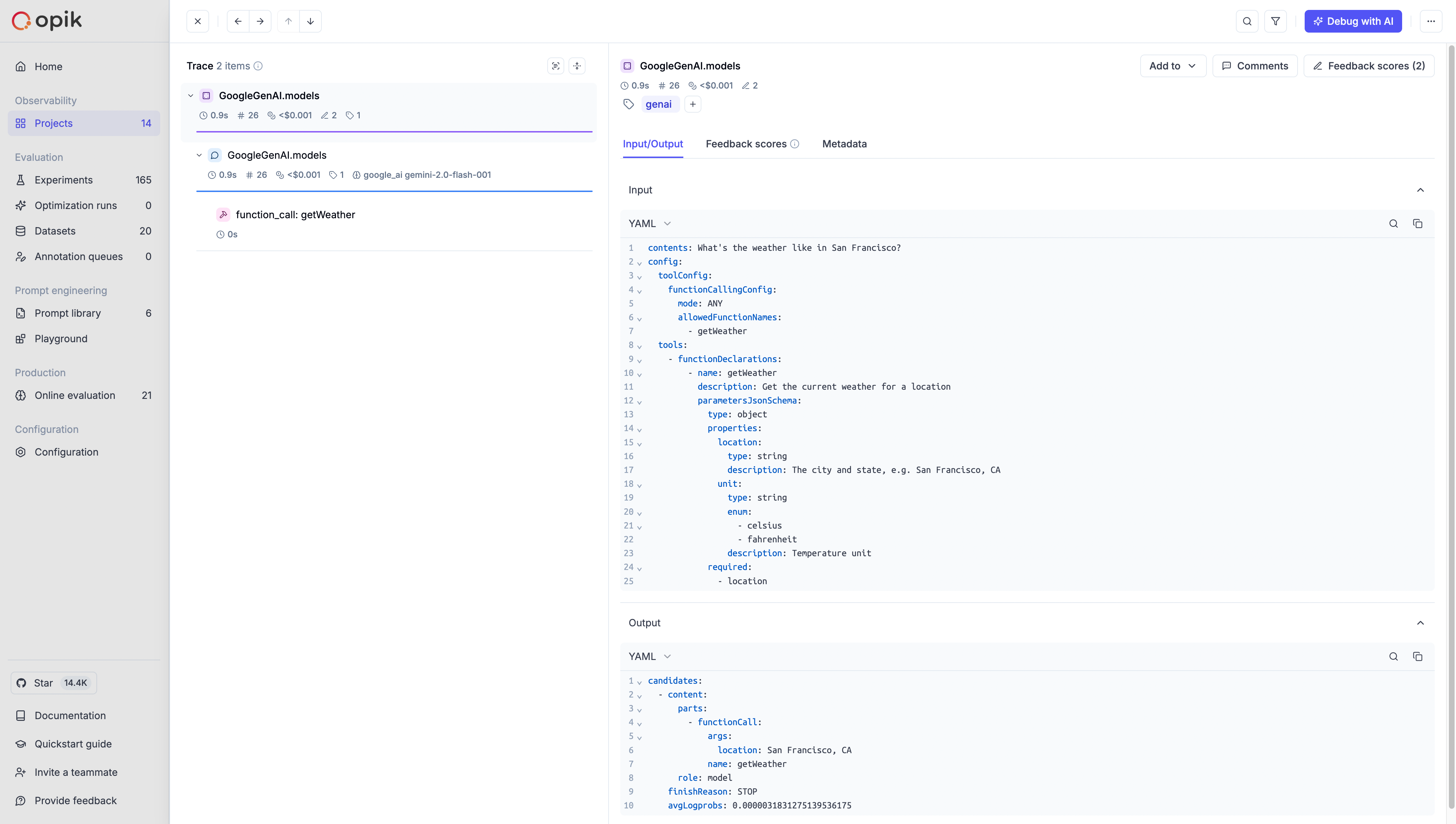
Opik provides seamless integration with the Google Generative AI Node.js SDK (@google/genai) through the opik-gemini package, allowing you to trace, monitor, and debug your Gemini API calls.
Features
Section titled “Features”- Comprehensive Tracing: Automatically trace Gemini API calls, including text generation, chat, and multimodal interactions
- Hierarchical Visualization: View your Gemini requests as structured traces with parent-child relationships
- Detailed Metadata Capture: Record model names, prompts, completions, token usage, and custom metadata
- Error Handling: Capture and visualize errors encountered during Gemini API interactions
- Custom Tagging: Add custom tags to organize and filter your traces
- Streaming Support: Full support for streamed responses with token-by-token tracing
- VertexAI Support: Works with both Google AI Studio and Vertex AI endpoints
Installation
Section titled “Installation”Option 1: Using npm
Section titled “Option 1: Using npm”npm install opik-gemini @google/genaiOption 2: Using yarn
Section titled “Option 2: Using yarn”yarn add opik-gemini @google/genaiRequirements
Section titled “Requirements”- Node.js ≥ 18
- Google Generative AI SDK (
@google/genai≥ 1.0.0) - Opik SDK (automatically installed as a dependency)
Note: The official Google GenAI SDK package is @google/genai (not @google/generative-ai). This is Google Deepmind's unified SDK for both Gemini Developer API and Vertex AI.
Basic Usage
Section titled “Basic Usage”Using with Google Generative AI Client
Section titled “Using with Google Generative AI Client”To trace your Gemini API calls, you need to wrap your Gemini client instance with the trackGemini function:
import { GoogleGenAI } from "@google/genai";
import { trackGemini } from "opik-gemini";

// Initialize the original Gemini client
const genAI = new GoogleGenAI({
  apiKey: process.env.GEMINI_API_KEY,
});

// Wrap the client with Opik tracking
const trackedGenAI = trackGemini(genAI);

// Generate content
const response = await trackedGenAI.models.generateContent({
  model: "gemini-2.0-flash-001",
  contents: "Hello, how can you help me today?",
});

console.log(response.text);

// Ensure all traces are sent before your app terminates
await trackedGenAI.flush();
Using with Streaming Responses
Section titled “Using with Streaming Responses”The integration fully supports Gemini's streaming responses:
import { GoogleGenAI } from "@google/genai";
import { trackGemini } from "opik-gemini";

const genAI = new GoogleGenAI({ apiKey: process.env.GEMINI_API_KEY });
const trackedGenAI = trackGemini(genAI);

async function streamingExample() {
  // Create a streaming generation
  const response = await trackedGenAI.models.generateContentStream({
    model: "gemini-2.0-flash-001",
    contents: "Write a short story about AI observability",
  });

  // Process the stream
  let streamedContent = "";
  for await (const chunk of response) {
    const chunkText = chunk.text;
    if (chunkText) {
      process.stdout.write(chunkText);
      streamedContent += chunkText;
    }
  }

  console.log("\nStreaming complete!");

  // Don't forget to flush when done
  await trackedGenAI.flush();
}

streamingExample();
Advanced Configuration
Section titled “Advanced Configuration”The trackGemini function accepts an optional configuration object to customize the integration:
import { GoogleGenAI } from "@google/genai";
import { trackGemini } from "opik-gemini";
import { Opik } from "opik";

// Optional: Create a custom Opik client
const customOpikClient = new Opik({
  apiKey: "YOUR_OPIK_API_KEY", // If not using environment variables
  projectName: "gemini-integration-project",
});

const existingOpikTrace = customOpikClient.trace({
  name: `Trace`,
  input: {
    prompt: `Hello, world!`,
  },
  output: {
    response: `Hello, world!`,
  },
});

const genAI = new GoogleGenAI({
  apiKey: process.env.GEMINI_API_KEY,
});

// Configure the tracked client with options
const trackedGenAI = trackGemini(genAI, {
  // Optional array of tags to apply to all traces
  traceMetadata: {
    tags: ["gemini", "production", "user-query"],

    // Optional metadata to include with all traces
    environment: "production",
    version: "1.2.3",
    component: "story-generator",
  },

  // Optional custom name for the generation/trace
  generationName: "StoryGenerationService",

  // Optional pre-configured Opik client
  // If not provided, a singleton instance will be used
  client: customOpikClient,

  // Optional parent trace for hierarchical relationships
  parent: existingOpikTrace,
});

// Use the tracked client with your configured options
const response = await trackedGenAI.models.generateContent({
  model: "gemini-2.0-flash-001",
  contents: "Generate a creative story",
});

console.log(response.text);

// Close the existing trace
existingOpikTrace.end();

// Flush before your application exits
await trackedGenAI.flush();
Using with VertexAI
Section titled “Using with VertexAI”The integration also supports Google's VertexAI platform. Simply configure your Gemini client for VertexAI and wrap it with trackGemini:
import { GoogleGenAI } from "@google/genai";
import { trackGemini } from "opik-gemini";

// Configure for VertexAI
const genAI = new GoogleGenAI({
  vertexai: true,
  project: "your-project-id",
  location: "us-central1",
});

const trackedGenAI = trackGemini(genAI);

const response = await trackedGenAI.models.generateContent({
  model: "gemini-2.0-flash-001",
  contents: "Write a short story about AI observability",
});

console.log(response.text);

// Flush before your application exits
await trackedGenAI.flush();
Chat Conversations
Section titled “Chat Conversations”Track multi-turn chat conversations with Gemini:
import { GoogleGenAI } from "@google/genai";
import { trackGemini } from "opik-gemini";

const genAI = new GoogleGenAI({ apiKey: process.env.GEMINI_API_KEY });
const trackedGenAI = trackGemini(genAI);

async function chatExample() {
  // Multi-turn conversation using generateContent with history
  const response = await trackedGenAI.models.generateContent({
    model: "gemini-2.0-flash-001",
    contents: [
      {
        role: "user",
        parts: [{ text: "Hello, I want to learn about AI observability." }],
      },
      {
        role: "model",
        parts: [
          {
            text: "Great! AI observability helps track and debug LLM applications.",
          },
        ],
      },
      {
        role: "user",
        parts: [{ text: "What are the key benefits of using Opik?" }],
      },
    ],
  });

  console.log(response.text);

  await trackedGenAI.flush();
}

chatExample();
Troubleshooting
Section titled “Troubleshooting”Missing Traces: Ensure your Gemini and Opik API keys are correct and that you're calling await trackedGenAI.flush() before your application exits.
Incomplete Data: For streaming responses, make sure you're consuming the entire stream before ending your application.
Hierarchical Traces: To create proper parent-child relationships, use the parent option in the configuration when you want Gemini calls to be children of another trace.
Performance Impact: The Opik integration adds minimal overhead to your Gemini API calls.
VertexAI Authentication: When using VertexAI, ensure you have properly configured your Google Cloud project credentials.