
Observability for Mastra with Opik
Mastra is the TypeScript agent framework designed to provide the essential primitives for building AI applications. It enables developers to create AI agents with memory and tool-calling capabilities, implement deterministic LLM workflows, and leverage RAG for knowledge integration.
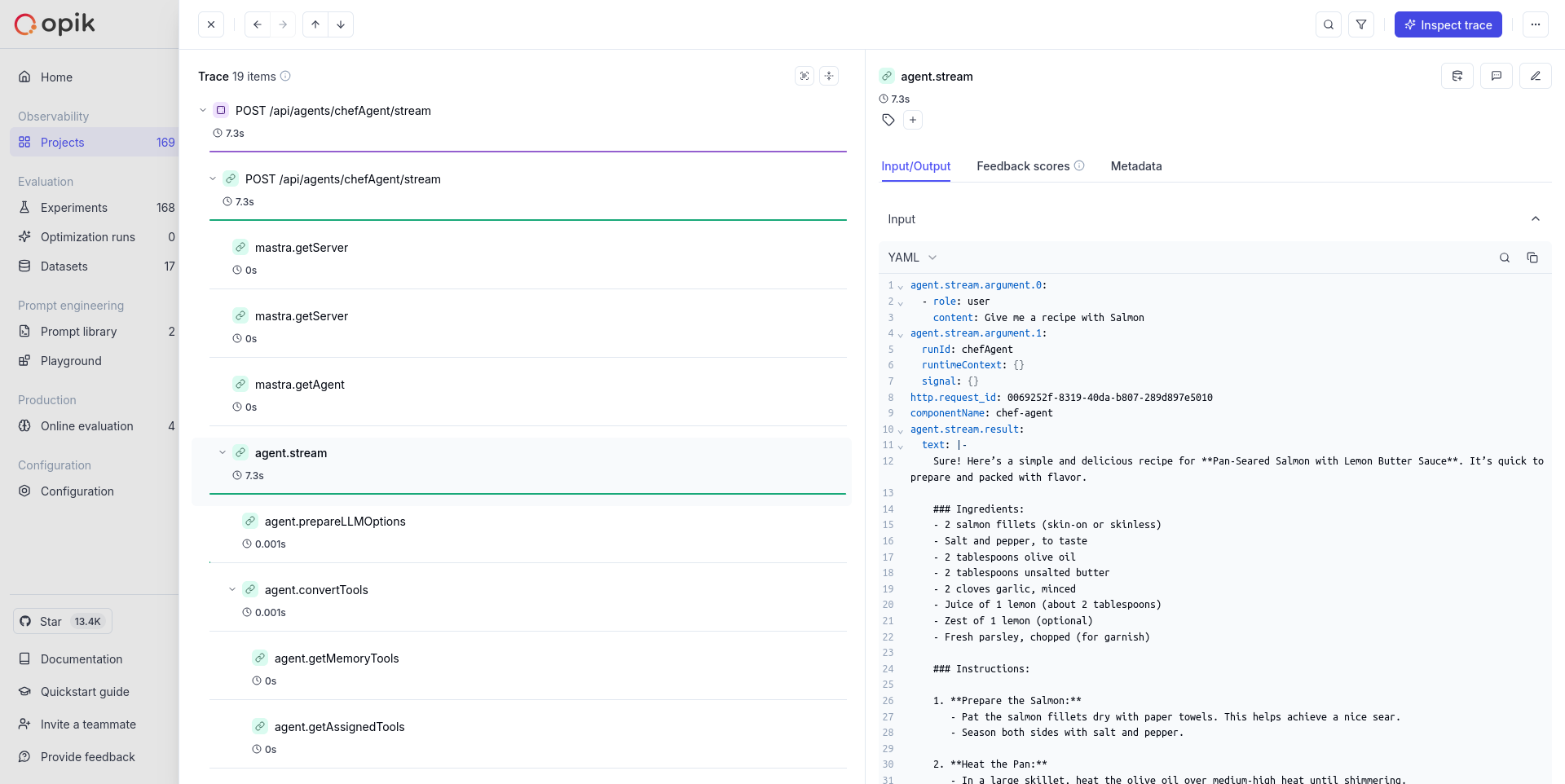
Mastra's primary advantage is its built-in telemetry support that automatically captures agent interactions, LLM calls, and workflow executions, making it easy to monitor and debug AI applications.
Getting started
Section titled “Getting started”Create a Mastra project
Section titled “Create a Mastra project”If you don't have a Mastra project yet, you can create one using the Mastra CLI:
npx create-mastra
cd your-mastra-project
Install required packages
Section titled “Install required packages”Install the necessary dependencies for Mastra observability:
npm install @mastra/observability @mastra/otelAdd environment variables
Section titled “Add environment variables”Create or update your .env file with the following variables:
# Your LLM API key
OPENAI_API_KEY=<YOUR_OPENAI_API_KEY>

# Opik configuration
OPIK_API_KEY=<your-opik-api-key>
OPIK_WORKSPACE_NAME=<your-workspace>
OPIK_PROJECT_NAME=<your-project-name># Your LLM API key
OPENAI_API_KEY=<YOUR_OPENAI_API_KEY>
# Opik configuration
OPIK_API_KEY=<your-opik-api-key>
OPIK_WORKSPACE_NAME=<your-workspace>
OPIK_PROJECT_NAME=<your-project-name># Your LLM API key
OPENAI_API_KEY=<YOUR_OPENAI_API_KEY>
# Opik configuration
OPIK_PROJECT_NAME=<your-project-name>Set up an agent
Section titled “Set up an agent”Create an agent in your project. For example, create a file src/mastra/index.ts:
import { Mastra } from "@mastra/core/mastra";
import { Observability } from "@mastra/observability";
import { OtelExporter } from "@mastra/otel";
import { PinoLogger } from "@mastra/loggers";
import { LibSQLStore } from "@mastra/libsql";
import { Agent } from "@mastra/core/agent";
import { openai } from "@ai-sdk/openai";

const OPIK_API_KEY = process.env.OPIK_API_KEY!;
const OPIK_WORKSPACE_NAME = process.env.OPIK_WORKSPACE_NAME!;
const OPIK_PROJECT_NAME = process.env.OPIK_PROJECT_NAME!;

export const chefAgent = new Agent({
  name: "chef-agent",
  instructions:
    "You are Michel, a practical and experienced home chef " +
    "You help people cook with whatever ingredients they have available.",
  model: openai("gpt-4o-mini"),
});

export const mastra = new Mastra({
  agents: { chefAgent },
  storage: new LibSQLStore({
    url: ":memory:",
  }),
  logger: new PinoLogger({
    name: "Mastra",
    level: "info",
  }),
  observability: new Observability({
    configs: {
      default: {
        serviceName: "chef-agent",
        exporters: [
          new OtelExporter({
            provider: {
              custom: {
                endpoint: "https://www.comet.com/opik/api/v1/private/otel/v1/traces",
                protocol: "http/json",
                headers: {
                  Authorization: OPIK_API_KEY,
                  "Comet-Workspace": OPIK_WORKSPACE_NAME,
                  projectName: OPIK_PROJECT_NAME,
                },
              },
            },
          }),
        ],
      },
    },
  }),
});import { Mastra } from "@mastra/core/mastra";
import { Observability } from "@mastra/observability";
import { OtelExporter } from "@mastra/otel";
import { PinoLogger } from "@mastra/loggers";
import { LibSQLStore } from "@mastra/libsql";
import { Agent } from "@mastra/core/agent";
import { openai } from "@ai-sdk/openai";
const OPIK_API_KEY = process.env.OPIK_API_KEY!;
const OPIK_WORKSPACE_NAME = process.env.OPIK_WORKSPACE_NAME!;
const OPIK_PROJECT_NAME = process.env.OPIK_PROJECT_NAME!;
export const chefAgent = new Agent({
name: "chef-agent",
instructions:
"You are Michel, a practical and experienced home chef " +
"You help people cook with whatever ingredients they have available.",
model: openai("gpt-4o-mini"),
});
export const mastra = new Mastra({
agents: { chefAgent },
storage: new LibSQLStore({
url: ":memory:",
}),
logger: new PinoLogger({
name: "Mastra",
level: "info",
}),
observability: new Observability({
configs: {
default: {
serviceName: "chef-agent",
exporters: [
new OtelExporter({
provider: {
custom: {
endpoint: "https://<comet-deployment-url>/opik/api/v1/private/otel/v1/traces",
protocol: "http/json",
headers: {
Authorization: OPIK_API_KEY,
"Comet-Workspace": OPIK_WORKSPACE_NAME,
projectName: OPIK_PROJECT_NAME,
},
},
},
}),
],
},
},
}),
});import { Mastra } from "@mastra/core/mastra";
import { Observability } from "@mastra/observability";
import { OtelExporter } from "@mastra/otel";
import { PinoLogger } from "@mastra/loggers";
import { LibSQLStore } from "@mastra/libsql";
import { Agent } from "@mastra/core/agent";
import { openai } from "@ai-sdk/openai";
const OPIK_PROJECT_NAME = process.env.OPIK_PROJECT_NAME!;
export const chefAgent = new Agent({
name: "chef-agent",
instructions:
"You are Michel, a practical and experienced home chef " +
"You help people cook with whatever ingredients they have available.",
model: openai("gpt-4o-mini"),
});
export const mastra = new Mastra({
agents: { chefAgent },
storage: new LibSQLStore({
url: ":memory:",
}),
logger: new PinoLogger({
name: "Mastra",
level: "info",
}),
observability: new Observability({
configs: {
default: {
serviceName: "chef-agent",
exporters: [
new OtelExporter({
provider: {
custom: {
endpoint: "http://localhost:5173/api/v1/private/otel/v1/traces",
protocol: "http/json",
headers: {
projectName: OPIK_PROJECT_NAME,
},
},
},
}),
],
},
},
}),
});Run Mastra development server
Section titled “Run Mastra development server”Start the Mastra development server:
npm run devHead over to the developer playground with the provided URL and start chatting with your agent.
What gets traced
Section titled “What gets traced”With this setup, your Mastra application will automatically trace:
- Agent interactions: Complete conversation flows with agents
- LLM calls: Model requests, responses, and token usage
- Tool executions: Function calls and their results
- Workflow steps: Individual steps in complex workflows
- Memory operations: Context and memory updates
Validation
Section titled “Validation”- Run the Mastra dev server and execute one agent chat.
- Confirm OTLP export requests are sent to your configured endpoint.
- Verify the trace in Opik under the expected workspace/project.
Source references
Section titled “Source references”Further improvements
Section titled “Further improvements”If you have any questions or suggestions for improving the Mastra integration, please open an issue on our GitHub repository.