
HRPO (Hierarchical Reflective Prompt Optimizer)
HRPO (Hierarchical Reflective Prompt Optimizer) uses hierarchical root cause analysis to identify and address
specific failure modes in your prompts. It analyzes evaluation results, identifies patterns in
failures, and generates targeted improvements to address each failure mode systematically.
How It Works
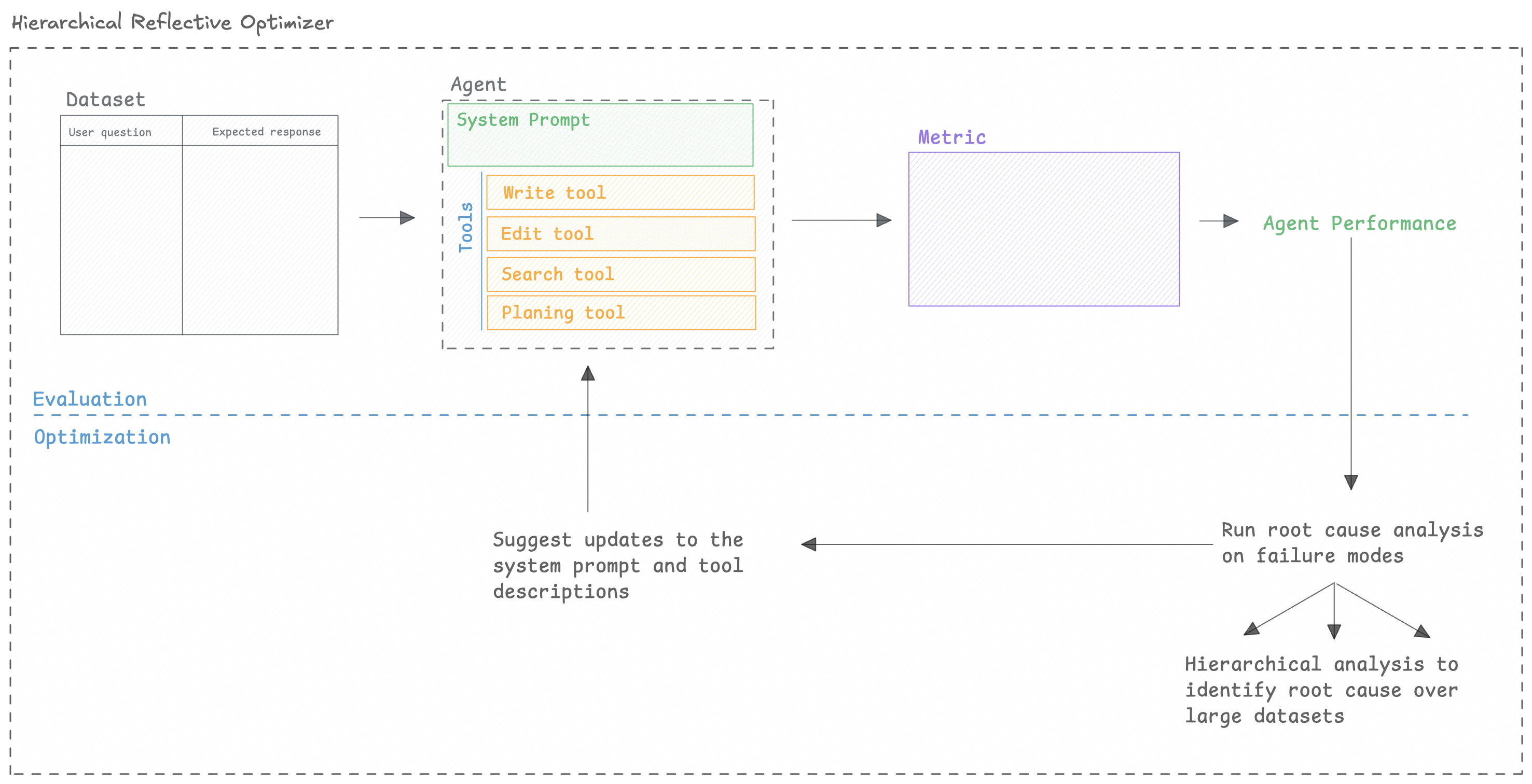
Section titled “How It Works”HRPO (Hierarchical Reflective Prompt Optimizer) has been developed by the Opik team to improve prompts that might have already gone through a few rounds of manual prompt engineering. It focuses on identifying why a prompt is failing and then updating the prompts to address the issues.
As datasets can be large, we split the analysis into batches and analyze them in parallel. We then synthesize the findings across all batches to identify the core issues with the prompt.
Quickstart
Section titled “Quickstart”You can use HRPO to optimize a prompt:
from opik_optimizer import HRPO, ChatPrompt, datasets
from opik.evaluation.metrics.score_result import ScoreResult

# 1. Define your evaluation dataset
dataset = datasets.hotpot(count=300)  # or use your own dataset

# 2. Configure the evaluation metric (MUST return reasons!)
def answer_quality_metric(dataset_item, llm_output):
    reference = dataset_item.get("answer", "")

    # Your scoring logic
    is_correct = reference.lower() in llm_output.lower()
    score = 1.0 if is_correct else 0.0

    # IMPORTANT: Provide detailed reasoning
    if is_correct:
        reason = f"Output contains the correct answer: '{reference}'"
    else:
        reason = f"Output does not contain expected answer '{reference}'. Output was too vague or incorrect."

    return ScoreResult(
        name="answer_quality",
        value=score,
        reason=reason  # Critical for root cause analysis!
    )

# 3. Define your initial prompt
initial_prompt = ChatPrompt(
    project_name="reflective_optimization",
    messages=[
        {
            "role": "system",
            "content": "You are a helpful assistant that answers questions accurately."
        },
        {
            "role": "user",
            "content": "Question: {question}\n\nProvide a concise answer."
        }
    ]
)

# 4. Initialize HRPO
optimizer = HRPO(
    model="gpt-4o",
    n_threads=8,
    max_parallel_batches=5,
    seed=42,
    model_parameters={"temperature": 0.7}
)

# 5. Run the optimization
optimization_result = optimizer.optimize_prompt(
    prompt=initial_prompt,
    dataset=dataset,
    metric=answer_quality_metric,
    n_samples=100,
    max_trials=5,
    max_retries=2
)

# 6. View the results
optimization_result.display()
Configuration Options
Section titled “Configuration Options”Optimizer parameters
Section titled “Optimizer parameters”The optimizer has the following parameters:
-
model(str) — LiteLLM model name for optimizer's internal reasoning/generation calls -
n_threads(int) — -
verbose(int) — Controls internal logging/progress bars (0=off, 1=on). -
seed(int) — Random seed for reproducibility (default: 42) -
max_parallel_batches(int) — -
batch_size(int) — -
convergence_threshold(float) — -
model_parameters(dict[str, typing.Any] | None) — Optional dict of LiteLLM parameters for optimizer's internal LLM calls.
optimize_prompt parameters
Section titled “optimize_prompt parameters”The optimize_prompt method has the following parameters:
-
prompt(ChatPrompt) — -
dataset(Dataset) — Opik dataset name, or Opik dataset -
metric(Callable) — A metric function, this function should have two arguments: -
experiment_config(dict | None) — -
n_samples(int | float | str | None) — Number of dataset items to use per evaluation. Use counts (e.g.,50), fractions (e.g.,0.1), percentages (e.g., "10%"), or "all"/"full"/None for the full dataset. -
n_samples_minibatch(int | None) — Optional number of samples for inner-loop minibatches (defaults to n_samples). -
n_samples_strategy(str | None) — Sampling strategy for subsampling (default: "random_sorted"). -
auto_continue(bool) — -
agent_class(type[opik_optimizer.optimizable_agent.OptimizableAgent] | None) — -
project_name(str) — -
max_trials(int) — -
max_retries(int) — -
kwargs(Any) —
Model Support
Section titled “Model Support”There are two models to consider when using HRPO:
HRPO.model: The model used for the root cause analysis and failure mode synthesis.ChatPrompt.model: The model used to evaluate the prompt.
The model parameter accepts any LiteLLM-supported model string (e.g., "gpt-4o", "azure/gpt-4",
"anthropic/claude-3-opus", "gemini/gemini-1.5-pro"). You can also pass in extra model parameters
using the model_parameters parameter:
optimizer = HRPO(
    model="anthropic/claude-3-opus-20240229",
    model_parameters={
        "temperature": 0.7,
        "max_tokens": 4096
    }
)
Next Steps
Section titled “Next Steps”- Explore specific Optimizers for algorithm details.
- Refer to the FAQ for common questions and troubleshooting.
- Refer to the API Reference for detailed configuration options.