
MetaPrompt Optimizer
The MetaPrompter is a specialized optimizer designed for meta-prompt optimization. It focuses on improving the structure and effectiveness of prompts through systematic analysis and refinement of prompt templates, instructions, and examples.
How it works
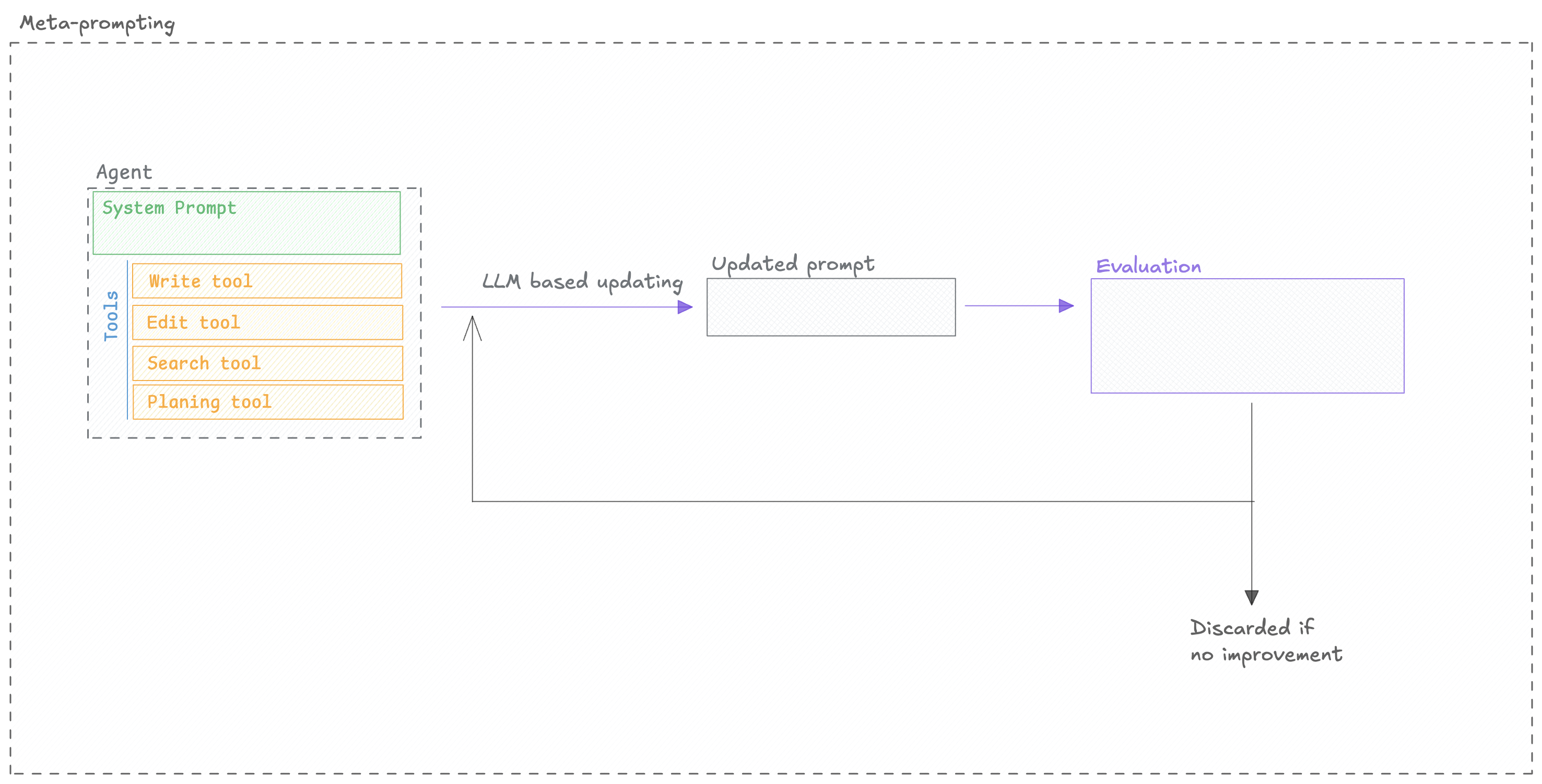
Section titled “How it works”The MetaPromptOptimizer automates the process of prompt refinement by using a "reasoning" LLM to
critique and improve your initial prompt. Here's a conceptual breakdown:
Quickstart
Section titled “Quickstart”You can use the MetaPromptOptimizer to optimize a prompt by following these steps:
from opik_optimizer import MetaPromptOptimizer
from opik.evaluation.metrics import LevenshteinRatio
from opik_optimizer import datasets, ChatPrompt

# Initialize optimizer
optimizer = MetaPromptOptimizer(
    model="openai/gpt-4",
    model_parameters={
        "temperature": 0.1,
        "max_tokens": 5000
    },
    n_threads=8,
    seed=42
)

# Prepare dataset
dataset = datasets.hotpot(count=300)

# Define metric and task configuration (see docs for more options)
def levenshtein_ratio(dataset_item, llm_output):
    return LevenshteinRatio().score(reference=dataset_item['answer'], output=llm_output)

prompt = ChatPrompt(
    messages=[
        {"role": "system", "content": "Provide an answer to the question."},
        {"role": "user", "content": "{question}"}
    ]
)

# Run optimization
results = optimizer.optimize_prompt(
    prompt=prompt,
    dataset=dataset,
    metric=levenshtein_ratio,
    n_samples=100
)

# Access results
results.display()
Configuration Options
Section titled “Configuration Options”Optimizer parameters
Section titled “Optimizer parameters”The optimizer has the following parameters:
-
model(str, default: openai/gpt-5-nano) — LiteLLM model name for optimizer's internal reasoning/generation calls -
model_parameters(dict[str, typing.Any] | None) — Optional dict of LiteLLM parameters for optimizer's internal LLM calls. Common params: temperature, max_tokens, max_completion_tokens, top_p. -
prompts_per_round(int, default: 4) — Number of candidate prompts to generate per optimization round -
enable_context(bool, default: True) — Whether to include task-specific context when reasoning about improvements -
n_threads(int, default: 12) — Number of parallel threads for prompt evaluation -
verbose(int, default: 1) — Controls internal logging/progress bars (0=off, 1=on) -
seed(int, default: 42) — Random seed for reproducibility
optimize_prompt parameters
Section titled “optimize_prompt parameters”The optimize_prompt method has the following parameters:
-
prompt(ChatPrompt) — The ChatPrompt to optimize. Can include system/user/assistant messages, tools, and model configuration. -
dataset(Dataset) — Opik Dataset containing evaluation examples. Each item is passed to the prompt during evaluation. -
metric(Callable) — Evaluation function that takes (dataset_item, llm_output) and returns a score (float). Higher scores indicate better performance. -
experiment_config(dict | None) — Optional metadata dictionary to log with Opik experiments. Useful for tracking experiment parameters and context. -
n_samples(int | float | str | None) — Number of dataset items to use per evaluation. Use counts (e.g.,50), fractions (e.g.,0.1), percentages (e.g., "10%"), or "all"/"full"/None for the full dataset. -
n_samples_minibatch(int | None) — Optional number of samples for inner-loop minibatches (defaults to n_samples). -
n_samples_strategy(str | None) — Sampling strategy for subsampling (default: "random_sorted"). -
auto_continue(bool, default: False) — If True, optimizer may continue beyond max_trials if improvements are still being found. -
agent_class(type[opik_optimizer.optimizable_agent.OptimizableAgent] | None) — Custom agent class for prompt execution. If None, uses default LiteLLM-based agent. Must inherit from OptimizableAgent. -
project_name(str, default: Optimization) — Opik project name for logging traces and experiments. Default: "Optimization" -
max_trials(int, default: 10) — Maximum total number of prompts to evaluate across all rounds. Optimizer stops when this limit is reached. -
mcp_config(opik_optimizer.mcp_utils.mcp_workflow.MCPExecutionConfig | None) — Optional MCP (Model Context Protocol) execution configuration for prompts that use external tools. Enables tool-calling workflows. Default: None -
candidate_generator(collections.abc.Callable[..., list[opik_optimizer.api_objects.chat_prompt.ChatPrompt]] | None) — Optional custom function to generate candidate prompts. Overrides default meta-reasoning generator. Should return list[ChatPrompt]. -
candidate_generator_kwargs(dict[str, typing.Any] | None) — Optional kwargs to pass to candidate_generator. -
args(Any) — -
kwargs(Any) —
Model Support
Section titled “Model Support”There are two models to consider when using the MetaPromptOptimizer:
MetaPromptOptimizer.model: The model used for the reasoning and candidate generation.ChatPrompt.model: The model used to evaluate the prompt.
The model parameter accepts any LiteLLM-supported model string (e.g., "gpt-4o", "azure/gpt-4",
"anthropic/claude-3-opus", "gemini/gemini-1.5-pro"). You can also pass in extra model parameters
using the model_parameters parameter:
optimizer = MetaPromptOptimizer(
    model="anthropic/claude-3-opus-20240229",
    model_parameters={
        "temperature": 0.7,
        "max_tokens": 4096
    }
)
MCP Tool Calling Support
Section titled “MCP Tool Calling Support”The MetaPrompt Optimizer is the only optimizer that currently supports MCP (Model Context Protocol) tool calling optimization. This means you can optimize prompts that include MCP tools and function calls.
For comprehensive information about tool optimization, see the Tool Optimization Guide.