
Evaluate agent trajectories
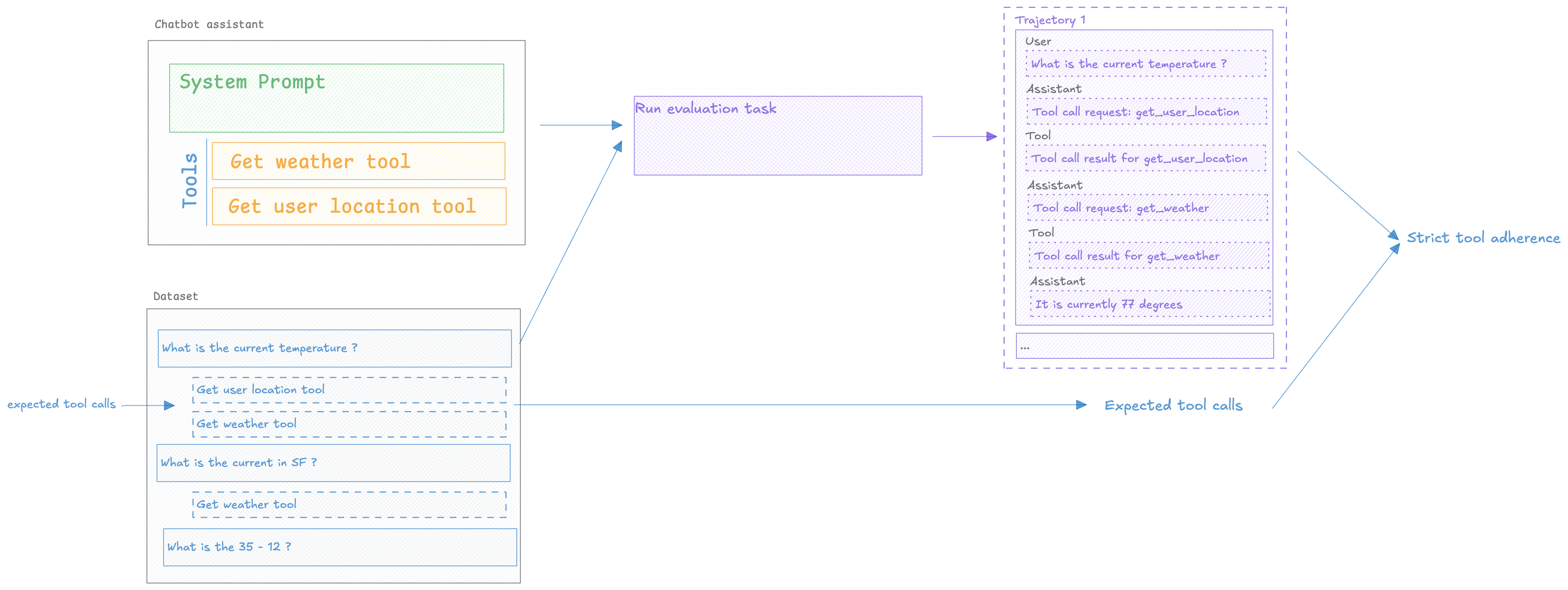
Evaluating agents requires more than checking the final output. You need to assess The trajectory — the steps your agent takes to reach an answer, including tool selection, reasoning chains, and intermediate decisions.
Agent trajectory evaluation helps you catch tool selection errors, identify inefficient reasoning paths, and optimize agent behavior before it reaches production.
Prerequisites
Section titled “Prerequisites”Before evaluating agent trajectories, you need:
- Opik SDK installed and configured — See Quickstart for setup
- Agent with observability enabled — Your agent must be instrumented with Opik tracing
- Test dataset — Examples with expected agent behavior
If your agent isn't traced yet, see Log Traces to add observability first.
Installing the Opik SDK
Section titled “Installing the Opik SDK”To install the Opik Python SDK you can run the following command:
pip install opikThen you can configure the SDK by running the following command:
opik configureThis will prompt you for your API key and workspace or your instance URL if you are self-hosting.
Adding observability to your agent
Section titled “Adding observability to your agent”In order to be able to evaluate the agent's trajectory, you need to add tracing to your agent. This will allow us to capture the agent's trajectory and evaluate it.
from langchain.agents import create_agentfrom opik.integrations.langchain import OpikTraceropik_tracer = OpikTracer()def get_weather(city: str) -> str: """Get weather for a given city.""" return f"It's always sunny in {city}!"agent = create_agent( model="openai:gpt-4o", tools=[get_weather], system_prompt="You are a helpful assistant")# Run the agentagent.invoke( {"messages": [{ "role": "user", "content": "what is the weather in sf" }]}, config={"callbacks": [opik_tracer]})import jsonimport openaifrom opik import trackfrom opik.integrations.openai import track_openaiopenai_client = track_openai(openai.OpenAI())# Define toolstools = [ { "type": "function", "function": { "name": "get_weather", "description": "Get weather for a given city.", "parameters": { "type": "object", "properties": {"city": {"type": "string"}}, } } }]@track(type="tool")def get_weather(city: str) -> str: """Get weather for a given city.""" return f"It's always sunny in {city}!"@trackdef agent_with_tools(user_input: str): messages = [{"role": "user", "content": user_input}] while True: response = openai_client.chat.completions.create( model="gpt-4o", messages=messages, tools=tools, tool_choice="auto" ) if response.choices[0].finish_reason == "tool_calls": messages.append(response.choices[0].message) for tool_call in response.choices[0].message.tool_calls: tool_name = tool_call.function.name tool_args = json.loads(tool_call.function.arguments) tool_result = get_weather(tool_args["city"]) user_input = f"The weather in {tool_args['city']} is {tool_result}" messages.append({ "role": "tool", "content": tool_result, "tool_call_id": tool_call.id }) else: break return messagesEvaluating your agent's trajectory
Section titled “Evaluating your agent's trajectory”In order to evaluate the agent's trajectory, we will need to create a dataset, define an evaluation metric and then run the evaluation.
Creating a dataset
Section titled “Creating a dataset”We are going to create a dataset with a set of user questions and some expected tools that the agent should be calling:
from opik import Opik

client = Opik()
dataset = client.get_or_create_dataset(name="agent_tool_selection", project_name="my-project")
dataset.insert([
    {
        "input": "What is 25 * 17?",
        "expected_tool": []
    },
    {
        "input": "What is the weather in SF?",
        "expected_tool": ["get_weather"]
    },
    {
        "input": "What is the weather in NY?",
        "expected_tool": ["get_weather"]
    }
])Defining the evaluation metric
Section titled “Defining the evaluation metric”In this task, we are going to measure Strict Tool Adherence which measures the agent's adherence
to the expected tools in the same order as they are expected.
The key to this metric is the use of the optional task_span parameter, this is available for all
custom metrics and can be used to access the agent's trajectory:
from opik.evaluation.metrics import BaseMetric, score_result
from opik.message_processing.emulation.models import SpanModel
from typing import List

class StrictToolAdherenceMetric(BaseMetric):
    def __init__(self, name: str = "strict_tool_adherence"):
        self.name = name

    def find_tools(self, task_span):
        """Find all tool spans in the SpanModel hierarchy."""
        tools_used = []

        def extract_tools_from_spans(spans):
            """Recursively extract tools from spans list."""
            for span in spans:
                # Check if this span is a tool
                if span.type == "tool" and span.name:
                    tools_used.append(span.name)

                # Recursively check nested spans
                if span.spans:
                    extract_tools_from_spans(span.spans)

        # Start the recursive search from the top level spans
        if task_span.spans:
            extract_tools_from_spans(task_span.spans)

        return tools_used

    def score(self, task_span: SpanModel,
              expected_tool: List[str], **kwargs):
        # Find tool calls in trajectory
        tool_used = self.find_tools(task_span)

        if tool_used == expected_tool:
            return score_result.ScoreResult(
                value=1.0,
                name=self.name,
                reason=f"Correct: used {tool_used}"
            )
        else:
            return score_result.ScoreResult(
                value=0.0,
                name=self.name,
                reason=f"Used {tool_used}, expected {expected_tool}"
            )
from opik.evaluation.metrics import BaseMetric, score_result
from opik.message_processing.emulation.models import SpanModel
from typing import List

class ToolAdherenceMetric(BaseMetric):
    def __init__(self, name: str = "tool_adherence"):
        self.name = name

    def find_tools(self, task_span):
        """Recursively find all tool spans in the SpanModel hierarchy."""
        tools_used = []

        def extract_tools_from_spans(spans):
            """Recursively extract tools from spans list."""
            for span in spans:
                # Check if this span is a tool
                if span.type == "tool" and span.name:
                    tools_used.append(span.name)

                # Recursively check nested spans
                if span.spans:
                    extract_tools_from_spans(span.spans)

        # Start the recursive search from the task_span's spans
        if task_span.spans:
            extract_tools_from_spans(task_span.spans)

        return tools_used

    def score(self, task_span: SpanModel,
              expected_tool: List[str], **kwargs):
        # Find tool calls in trajectory
        tool_used = self.find_tools(task_span)

        if set(tool_used) == set(expected_tool):
            return score_result.ScoreResult(
                value=1.0,
                name=self.name,
                reason=f"Correct: used {tool_used}"
            )
        else:
            return score_result.ScoreResult(
                value=0.0,
                name=self.name,
                reason=f"Used {tool_used}, expected {expected_tool}"
            )
Running the evaluation
Section titled “Running the evaluation”Let's define our evaluation task that will run our agent and return the assistant's response:
def evaluation_task(dataset_item: dict) -> dict:
    res = agent.invoke(
        {"messages": [{
            "role": "user",
            "content": dataset_item["input"]
        }]},
        config={"callbacks": [opik_tracer]}
    )

return {"output": res['messages'][-1].content}def evaluation_task(dataset_item: dict) -> dict:
res = agent_with_tools(dataset_item["input"])
return {"output": messages[-1]['content']}Now that we have our dataset and metric, we can run the evaluation:
from opik.evaluation import evaluate

# Run the evaluation
experiment = evaluate(
    dataset=dataset,
    task=evaluation_task,
    scoring_metrics=[StrictToolAdherenceMetric()],
    project_name="my-project"
)
Analyzing the results
Section titled “Analyzing the results”The Opik experiment dashboard provides a rich set of tools to help you analyze the results of the trajectory evaluation.
You can see the results of the evaluation in the Opik UI:
Next Steps
Section titled “Next Steps”Now that you can evaluate agent trajectories:
- Learn about Task Span Metrics for advanced trajectory analysis patterns
- Optimize your agent with Agent Optimization
- Monitor agents in production with Production Monitoring