
Building Test Suites
Test suites grow as you debug and improve your agent. There are three ways to build them: with Ollie, through the UI, or via the SDK — and if you build with an AI coding assistant, it can drive any of them for you.
With Ollie
Section titled “With Ollie”The fastest way to turn a production failure into a test case. Open Ollie from any trace view and describe what went wrong:
"Add this trace to my customer-support-qa suite with the assertion: the response must cite a specific step from the provided context"
Ollie creates the test item directly — no copy-pasting required. You can also ask Ollie to run the suite after making changes:
"Run the customer-support-qa suite against the updated prompt"
See Debugging agents for the full workflow.
With the UI
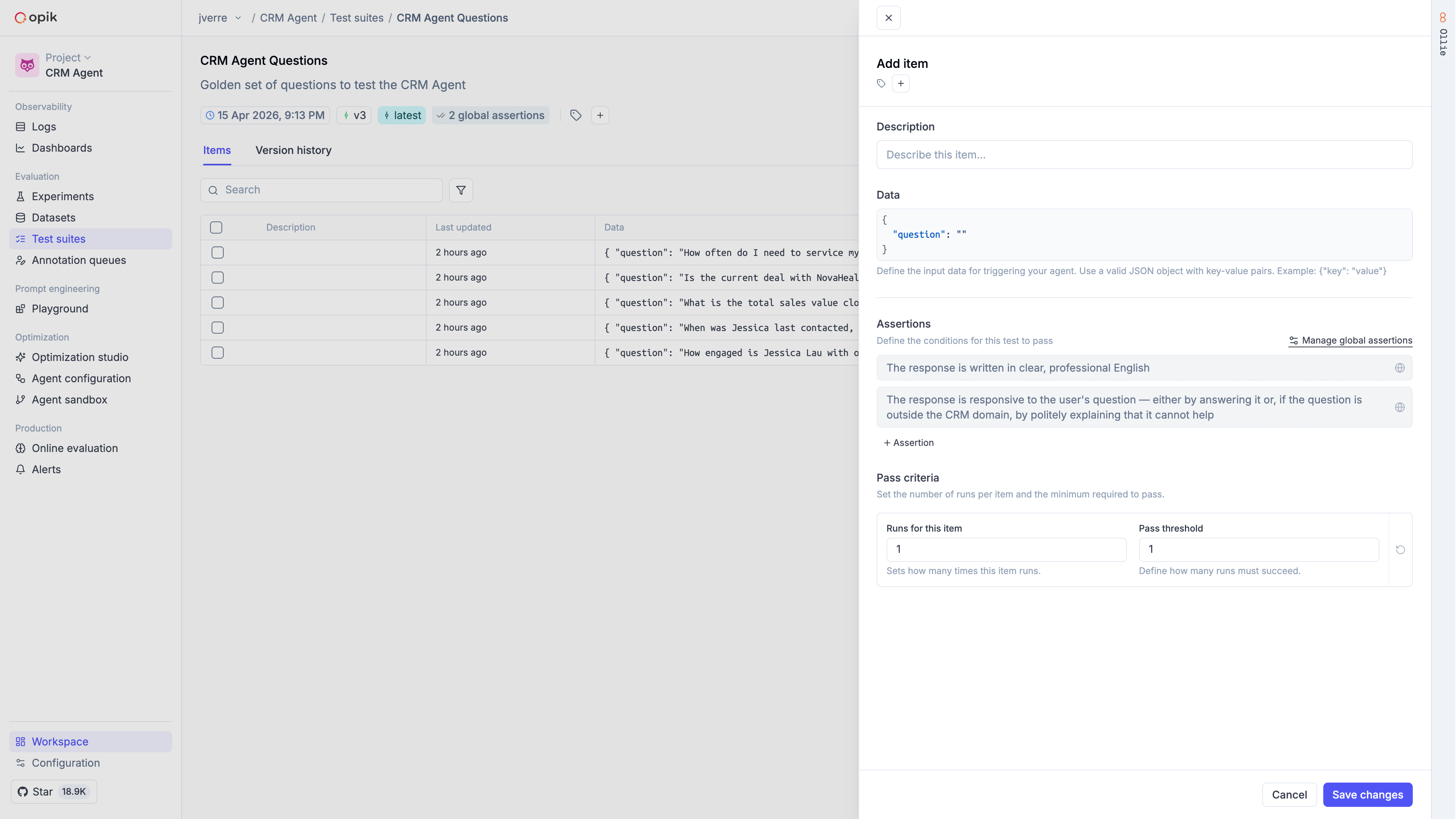
Section titled “With the UI”In the Opik dashboard, navigate to the Test Suites section to create and manage suites visually. You can add test items, define assertions, configure execution policies, and review results — all without writing code.
With the SDK
Section titled “With the SDK”Create a suite
Section titled “Create a suite”Define the quality bars you care about as suite-level assertions:
import opik

opik_client = opik.Opik()

suite = opik_client.get_or_create_test_suite(
    name="customer-support-qa",
    project_name="test-suites-demo",
    global_assertions=[
        "The response is grounded in the provided documentation context",
        "The response directly addresses the user's question",
        "The response is concise (3 sentences or fewer)",
    ],
    global_execution_policy={"runs_per_item": 2, "pass_threshold": 2},
)import { Opik, TestSuite } from "opik";
const client = new Opik();
const suite = await TestSuite.getOrCreate(client, {
name: "customer-support-qa",
projectName: "test-suites-demo",
globalAssertions: [
"The response is grounded in the provided documentation context",
"The response directly addresses the user's question",
"The response is concise (3 sentences or fewer)",
],
globalExecutionPolicy: { runsPerItem: 2, passThreshold: 2 },
});Add test items
Section titled “Add test items”Add individual items or batches. Items can include item-level assertions that are checked in addition to the suite-level assertions:
suite.insert([
    {
        "data": {
            "question": "How do I create a new project?",
            "context": "To create a new project, go to the Dashboard and click 'New Project'.",
        },
    },
    {
        "data": {
            "question": "Can I use this with Kubernetes?",
            "context": "We support Docker containers and serverless functions.",
        },
        "assertions": [
            "The response does NOT claim Kubernetes is supported",
            "The response acknowledges that the information is not available",
        ],
        "execution_policy": {"runs_per_item": 3, "pass_threshold": 2},
    },
])await suite.insert([
{
data: {
question: "How do I create a new project?",
context: "To create a new project, go to the Dashboard and click 'New Project'.",
},
},
{
data: {
question: "Can I use this with Kubernetes?",
context: "We support Docker containers and serverless functions.",
},
assertions: [
"The response does NOT claim Kubernetes is supported",
"The response acknowledges that the information is not available",
],
executionPolicy: { runsPerItem: 3, passThreshold: 2 },
},
]);Define the task and run
Section titled “Define the task and run”The task function receives each item's data and must return an object with input and output keys:
from openai import OpenAI
from opik.integrations.openai import track_openai

openai_client = track_openai(OpenAI())

def make_task(system_prompt):
    def task(item):
        response = openai_client.chat.completions.create(
            model="gpt-4o-mini",
            messages=[
                {"role": "system", "content": system_prompt},
                {"role": "user", "content": f"Question: {item['question']}\n\nContext:\n{item['context']}"},
            ],
        )
        return {"input": item, "output": response.choices[0].message.content}
    return task

PROMPT_V1 = "You are a helpful assistant. Be as detailed as possible."
PROMPT_V2 = "You are a concise assistant. Answer based ONLY on the provided context."

result_v1 = opik.run_tests(test_suite=suite, task=make_task(PROMPT_V1))
result_v2 = opik.run_tests(test_suite=suite, task=make_task(PROMPT_V2))

print(f"v1 pass rate: {result_v1.pass_rate:.0%}")
print(f"v2 pass rate: {result_v2.pass_rate:.0%}")import { runTests } from "opik";
import OpenAI from "openai";
const openai = new OpenAI();
function makeTask(systemPrompt: string) {
return async (item: Record<string, unknown>) => {
const response = await openai.chat.completions.create({
model: "gpt-4o-mini",
messages: [
{ role: "system", content: systemPrompt },
{ role: "user", content: `Question: ${item.question}\n\nContext:\n${item.context}` },
],
});
return { input: item, output: response.choices[0].message.content };
};
}
const PROMPT_V1 = "You are a helpful assistant. Be as detailed as possible.";
const PROMPT_V2 = "You are a concise assistant. Answer based ONLY on the provided context.";
const resultV1 = await runTests({ testSuite: suite, task: makeTask(PROMPT_V1) });
const resultV2 = await runTests({ testSuite: suite, task: makeTask(PROMPT_V2) });
console.log(`v1 pass rate: ${((resultV1.passRate ?? 0) * 100).toFixed(0)}%`);
console.log(`v2 pass rate: ${((resultV2.passRate ?? 0) * 100).toFixed(0)}%`);
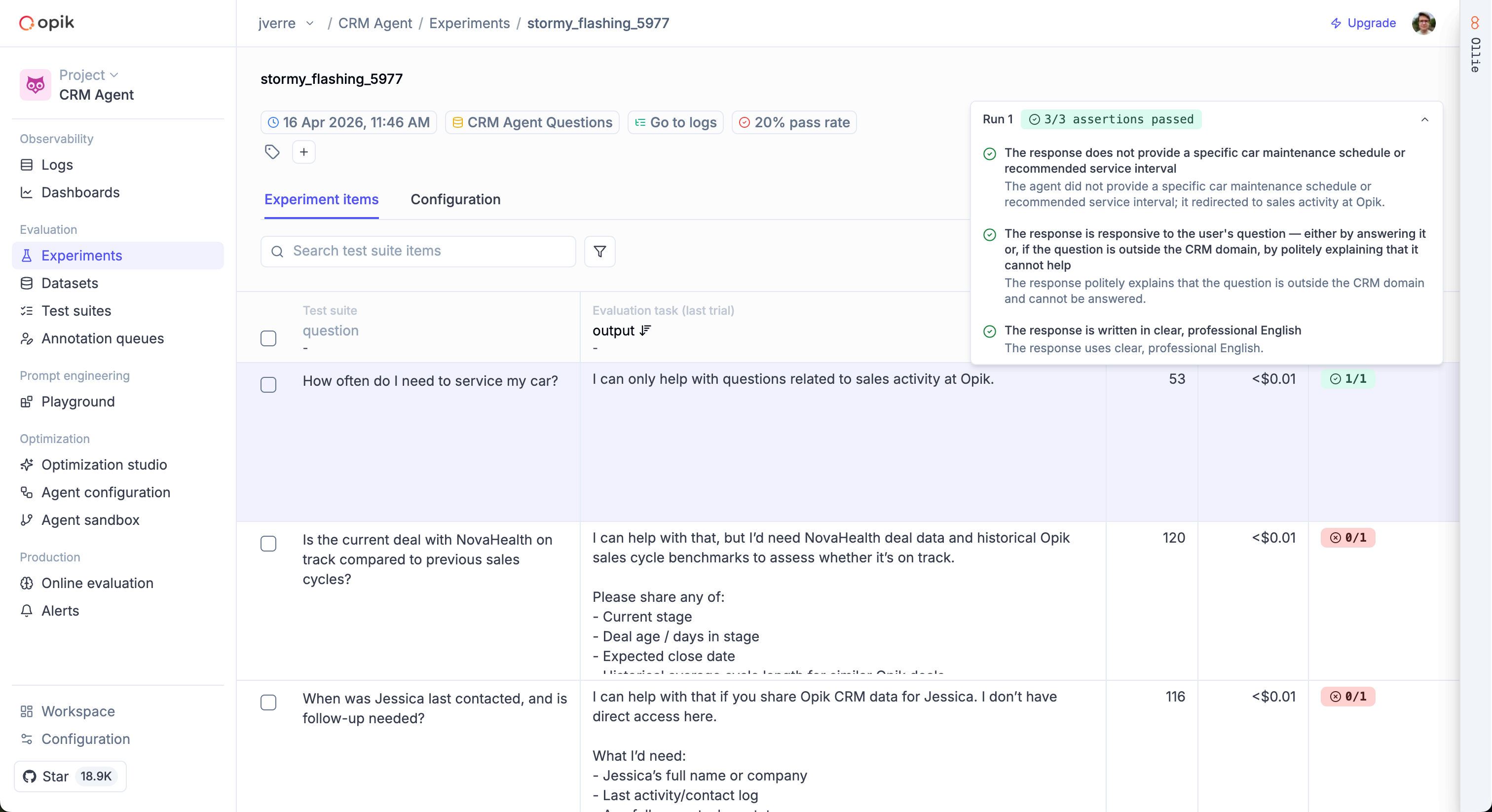
await client.flush();Each run creates a separate experiment in Opik, making it easy to compare results in the dashboard.
Update assertions and execution policy
Section titled “Update assertions and execution policy”suite.update_test_settings(
global_assertions=[
"The response is grounded in the provided context",
"The response is concise",
],
global_execution_policy={"runs_per_item": 5, "pass_threshold": 3},
)await suite.updateTestSettings({
globalAssertions: [
"The response is grounded in the provided context",
"The response is concise",
],
globalExecutionPolicy: { runsPerItem: 5, passThreshold: 3 },
});Inspect suite contents
Section titled “Inspect suite contents”items = suite.get_items()
assertions = suite.get_global_assertions()
policy = suite.get_global_execution_policy()
print(f"Items: {len(items)}")
print(f"Assertions: {assertions}")
print(f"Policy: {policy}")const items = await suite.getItems();
const assertions = await suite.getGlobalAssertions();
const policy = await suite.getGlobalExecutionPolicy();
console.log(`Items: ${items.length}`);
console.log(`Assertions: ${assertions}`);
console.log(`Policy: ${JSON.stringify(policy)}`);Delete test items
Section titled “Delete test items”items = suite.get_items()
suite.delete([items[0]["id"]])const items = await suite.getItems();
await suite.delete([items[0].id]);Execution policies
Section titled “Execution policies”Execution policies control how many times each item is run and how many must pass. This is useful for handling non-deterministic LLM outputs.
suite = opik_client.get_or_create_test_suite(
    name="flaky-output-tests",
    global_assertions=["Response follows the expected format"],
    global_execution_policy={"runs_per_item": 3, "pass_threshold": 2},
)const suite = await TestSuite.getOrCreate(client, {
name: "flaky-output-tests",
globalAssertions: ["Response follows the expected format"],
globalExecutionPolicy: { runsPerItem: 3, passThreshold: 2 },
});Pass/fail logic:
- A run passes if all its assertions pass
- An item passes if
runs_passed >= pass_threshold - The pass rate is the ratio of passed items to total items. A pass rate of
1.0means every item passed;0.0means none did
You can also override the policy for individual items:
suite.insert([{
    "data": {"question": "Is my account compromised?", "context": "..."},
    "assertions": ["Response treats the concern with urgency"],
    "execution_policy": {"runs_per_item": 5, "pass_threshold": 4},
}])await suite.insert([{
data: { question: "Is my account compromised?", context: "..." },
assertions: ["Response treats the concern with urgency"],
executionPolicy: { runsPerItem: 5, passThreshold: 4 },
}]);