
Evaluate multi-turn agents
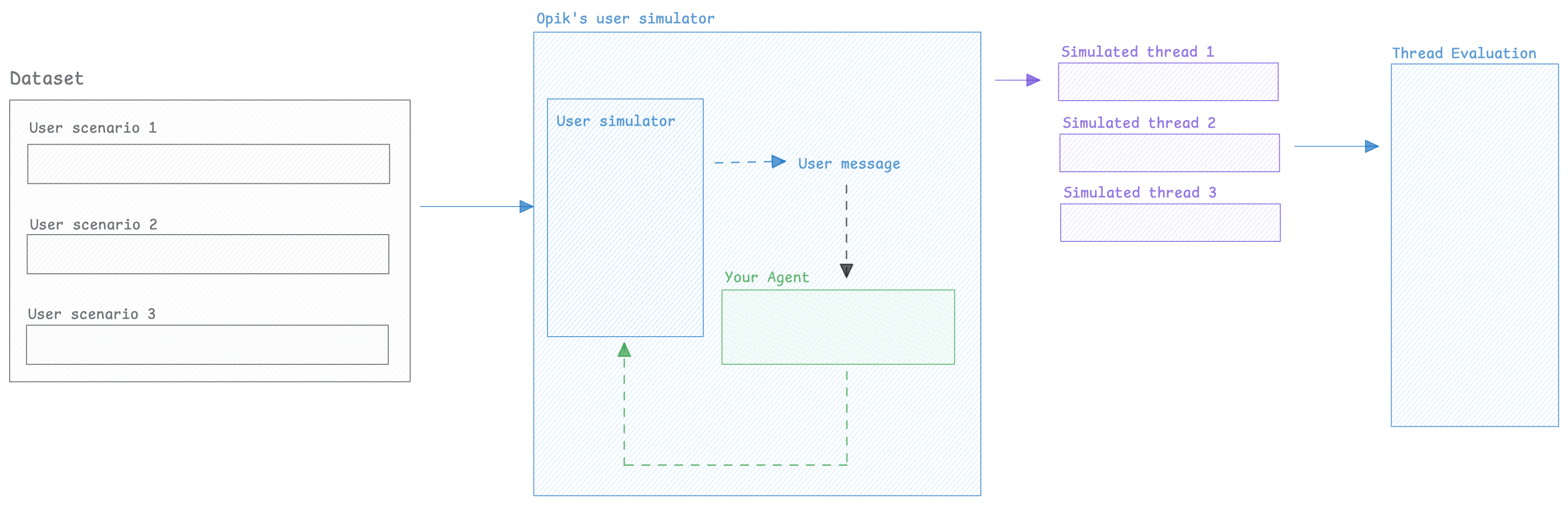
When working on chatbots or multi-turn agents, it can be challenging to evaluate the agent's behavior over multiple turns because you don't know what the user would ask as a follow-up question.
To solve this, we can use an LLM to simulate the user — generating realistic follow-up messages based on the conversation so far and running this for a configurable number of turns.
Once we have this conversation, we can use Opik evaluation features to score the agent's behavior.
Creating the user simulator
Section titled “Creating the user simulator”In order to perform multi-turn evaluation, we need to create a user simulator that will generate the user's response based on previous turns
from opik.simulation import SimulatedUser

user_simulator = SimulatedUser(
    persona="You are a frustrated user who wants a refund",
    model="openai/gpt-4.1",
)

conversation_history = [
    {"role": "assistant", "content": "Hello, how can I help you today?"}
]

for turn in range(3):
    # Generate a user message based on the conversation so far
    user_message = user_simulator.generate_response(conversation_history)
    conversation_history.append({"role": "user", "content": user_message})
    print(f"User: {user_message}")

    # In practice, this would be your agent's response
    agent_response = f"Placeholder agent response for turn {turn + 1}"
    conversation_history.append({"role": "assistant", "content": agent_response})
    print(f"Assistant: {agent_response}\n")
Now that we have a way to simulate the user, we can create multiple simulations that we will in turn evaluate.
Running simulations
Section titled “Running simulations”1. Create a list of scenarios
In order to more easily keep track of the scenarios we will be running, let's create a dataset with the user personas we will be using:
Create dataset with user personas import opik opik_client = opik.Opik() dataset = opik_client.get_or_create_dataset(name="Multi-turn evaluation", project_name="my-project") dataset.insert([ {"user_persona": "You are a frustrated user who wants a refund"}, {"user_persona": "You are a user who is happy with your product and wants to buy more"}, {"user_persona": "You are a user who is having trouble with your product and wants to get help"} ])2. Create our agent app
The
run_simulationfunction expects anappcallable with the following contract: it receives auser_messagestring and athread_idkeyword argument, and returns a message dict{"role": "assistant", "content": "..."}. The app is responsible for managing its own conversation history using thethread_id.Here is an example using LangChain:
Example agent app (LangChain) from langchain.agents import create_agent from opik.integrations.langchain import OpikTracer opik_tracer = OpikTracer() agent = create_agent( model="openai:gpt-4.1", tools=[], system_prompt="You are a helpful assistant", ) agent_history = {} def run_agent(user_message: str, *, thread_id: str, **kwargs) -> dict[str, str]: if thread_id not in agent_history: agent_history[thread_id] = [] agent_history[thread_id].append({"role": "user", "content": user_message}) messages = agent_history[thread_id] response = agent.invoke({"messages": messages}, config={"callbacks": [opik_tracer]}) agent_history[thread_id] = response["messages"] return {"role": "assistant", "content": response["messages"][-1].content}3. Run the simulations
Now that we have a dataset with the user personas, we can run the simulations:
Run simulations import opik from opik.simulation import SimulatedUser, run_simulation # Fetch the user personas opik_client = opik.Opik() dataset = opik_client.get_or_create_dataset(name="Multi-turn evaluation", project_name="my-project") # Run the simulations all_simulations = [] for item in dataset.get_items(): user_persona = item["user_persona"] user_simulator = SimulatedUser( persona=user_persona, model="openai/gpt-4.1", ) simulation = run_simulation( app=run_agent, user_simulator=user_simulator, max_turns=5, ) all_simulations.append(simulation)Each simulation result is a dictionary with:
thread_id: Unique identifier for the conversation threadconversation_history: List of message dicts ({"role": "user"|"assistant", "content": "..."})
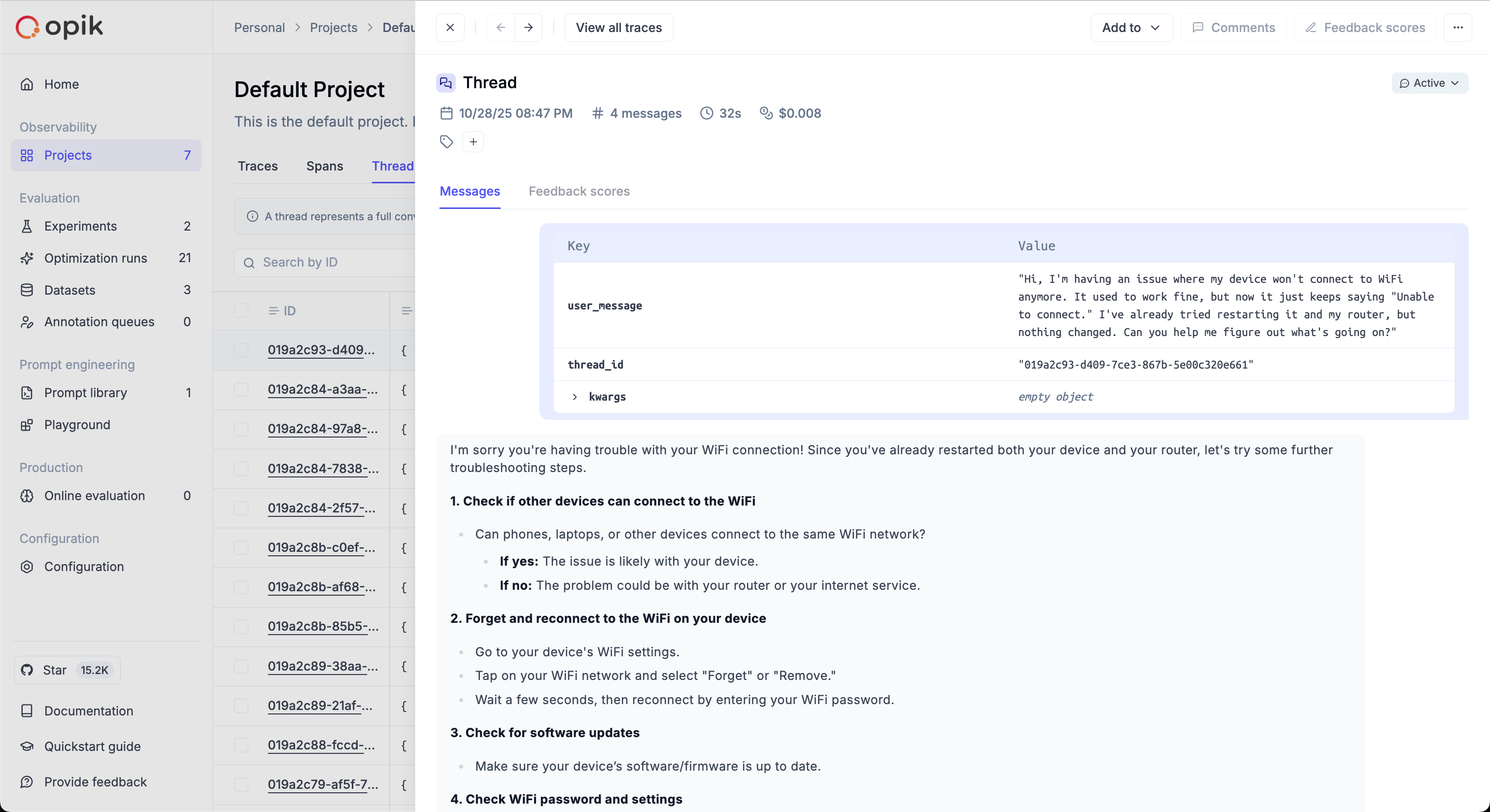
The simulated threads will be available in the Opik thread UI:
Scoring threads
Section titled “Scoring threads”When working on evaluating multi-turn conversations, you can use one of Opik's built-in conversation metrics or create your own.
If you've used the run_simulation function, you will already have a list of conversation messages
that you can pass directly to the metrics, otherwise you can use the evaluate_threads function:
import opik
from opik.evaluation.metrics import ConversationalCoherenceMetric, UserFrustrationMetric

opik_client = opik.Opik()

# Define the metrics you want to use
conversation_coherence_metric = ConversationalCoherenceMetric()
user_frustration_metric = UserFrustrationMetric()

for simulation in all_simulations:
    conversation = simulation["conversation_history"]

    coherence_score = conversation_coherence_metric.score(conversation)
    frustration_score = user_frustration_metric.score(conversation)

    opik_client.log_threads_feedback_scores(
        scores=[
            {
                "id": simulation["thread_id"],
                "name": "conversation_coherence",
                "value": coherence_score.value,
                "reason": coherence_score.reason
            },
            {
                "id": simulation["thread_id"],
                "name": "user_frustration",
                "value": frustration_score.value,
                "reason": frustration_score.reason
            }
        ]
)import opik
from opik.evaluation import evaluate_threads
from opik.evaluation.metrics import ConversationalCoherenceMetric, UserFrustrationMetric
opik_client = opik.Opik()
conversation_coherence_metric = ConversationalCoherenceMetric()
user_frustration_metric = UserFrustrationMetric()
results = evaluate_threads(
project_name="multi_turn_evaluation",
filter_string=f'thread_id = "<THREAD_ID>"',
metrics=[conversation_coherence_metric, user_frustration_metric],
trace_input_transform=lambda x: x["input"],
trace_output_transform=lambda x: x["output"],
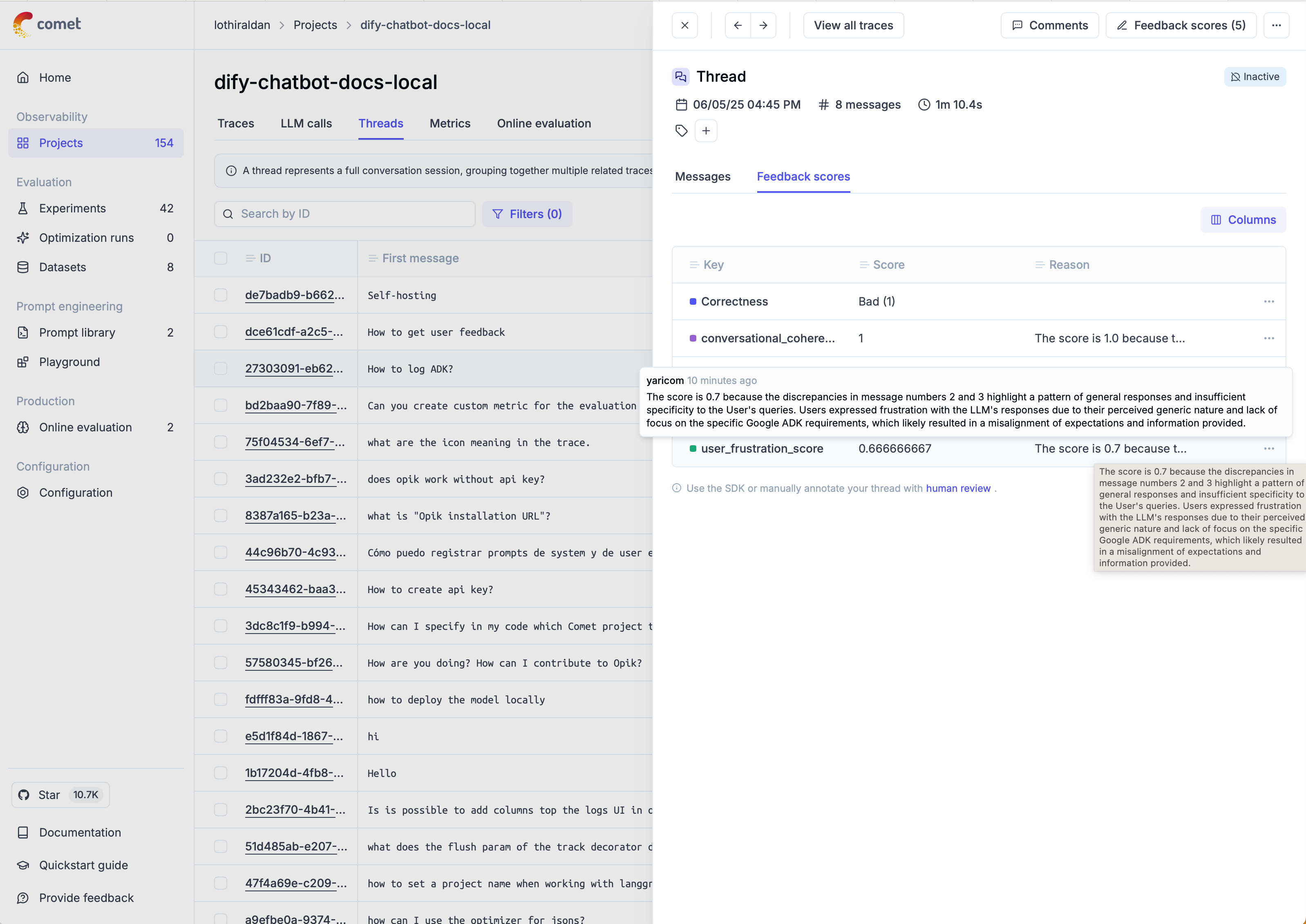
)Once the threads have been scored, you can view the results in the Opik thread UI:
Next steps
Section titled “Next steps”- Learn more about conversation metrics
- Learn more about custom conversation metrics
- Learn more about evaluate_threads
- Learn more about agent trajectory evaluation