
Observability for AutoGen with Opik
Autogen is a framework for building AI agents and applications built and maintained by Microsoft.
Autogen's primary advantage is its enterprise-ready architecture with built-in logging and observability features, making it ideal for production multi-agent systems that require robust monitoring and debugging capabilities.
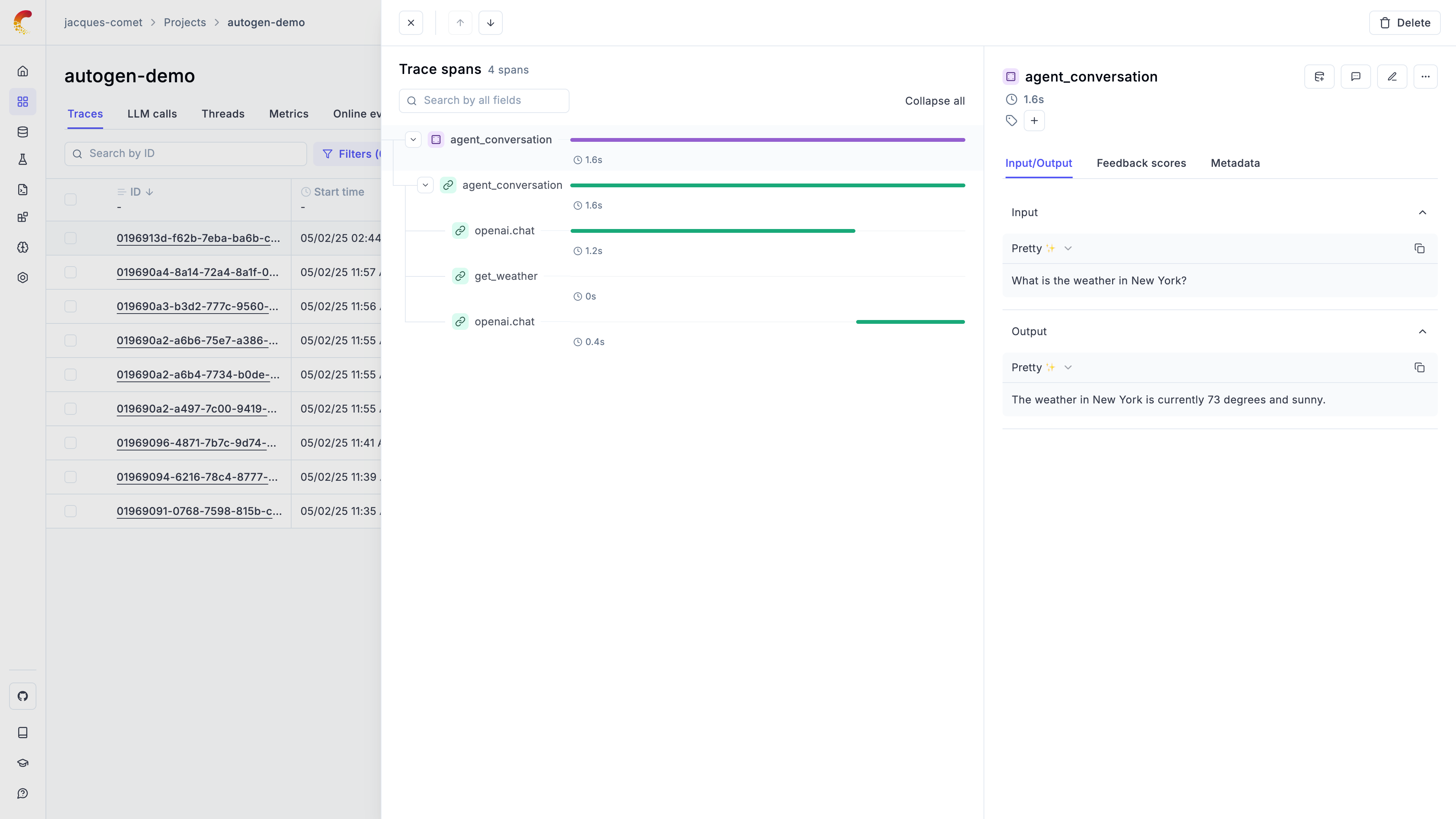
Getting started
Section titled “Getting started”To use the Autogen integration with Opik, you will need to have the following packages installed:
pip install -U "autogen-agentchat" "autogen-ext[openai]" opik opentelemetry-sdk opentelemetry-instrumentation-openai opentelemetry-exporter-otlpIn addition, you will need to set the following environment variables to configure the OpenTelemetry integration:
If you are using Opik Cloud, you will need to set the following environment variables:
export OTEL_EXPORTER_OTLP_ENDPOINT=https://www.comet.com/opik/api/v1/private/otel
export OTEL_EXPORTER_OTLP_HEADERS='Authorization=<your-api-key>,Comet-Workspace=default'If you are using an Enterprise deployment of Opik, you will need to set the following environment variables:
export OTEL_EXPORTER_OTLP_ENDPOINT=https://<comet-deployment-url>/opik/api/v1/private/otel
export OTEL_EXPORTER_OTLP_HEADERS='Authorization=<your-api-key>,Comet-Workspace=default'If you are self-hosting Opik, you will need to set the following environment variables:
export OTEL_EXPORTER_OTLP_ENDPOINT=http://localhost:5173/api/v1/private/otelUsing Opik with Autogen
Section titled “Using Opik with Autogen”The Autogen library includes some examples on how to integrate with OpenTelemetry compatible tools, you can learn more about it here:
- If you are using autogen-core
- If you are using autogen_agentchat
In the example below, we will focus on the autogen_agentchat library that is a
little easier to use:
# First we will configure the OpenTelemetry
from opentelemetry import trace
from opentelemetry.exporter.otlp.proto.http.trace_exporter import (
    OTLPSpanExporter
)
from opentelemetry.sdk.resources import Resource
from opentelemetry.sdk.trace import TracerProvider
from opentelemetry.sdk.trace.export import BatchSpanProcessor
from opentelemetry.instrumentation.openai import OpenAIInstrumentor

def setup_telemetry():
    """Configure OpenTelemetry with HTTP exporter"""
    # Create a resource with service name and other metadata
    resource = Resource.create({
        "service.name": "autogen-demo",
        "service.version": "1.0.0",
        "deployment.environment": "development"
    })

    # Create TracerProvider with the resource
    provider = TracerProvider(resource=resource)

    # Create BatchSpanProcessor with OTLPSpanExporter
    processor = BatchSpanProcessor(
        OTLPSpanExporter()
    )
    provider.add_span_processor(processor)

    # Set the TracerProvider
    trace.set_tracer_provider(provider)

    # Instrument OpenAI calls
    OpenAIInstrumentor().instrument()

# Now we can define and call the Agent
import asyncio
from autogen_agentchat.agents import AssistantAgent
from autogen_agentchat.ui import Console
from autogen_ext.models.openai import OpenAIChatCompletionClient


# Define a model client. You can use other model client that implements
# the `ChatCompletionClient` interface.
model_client = OpenAIChatCompletionClient(
    model="gpt-4o",
    # api_key="YOUR_API_KEY",
)

# Define a simple function tool that the agent can use.
# For this example, we use a fake weather tool for demonstration purposes.
async def get_weather(city: str) -> str:
    """Get the weather for a given city."""
    return f"The weather in {city} is 73 degrees and Sunny."


# Define an AssistantAgent with the model, tool, system message, and reflection
# enabled. The system message instructs the agent via natural language.
agent = AssistantAgent(
    name="weather_agent",
    model_client=model_client,
    tools=[get_weather],
    system_message="You are a helpful assistant.",
    reflect_on_tool_use=True,
    model_client_stream=True,  # Enable streaming tokens from the model client.
)


# Run the agent and stream the messages to the console.
async def main() -> None:
    tracer = trace.get_tracer(__name__)
    with tracer.start_as_current_span("agent_conversation") as span:
        task = "What is the weather in New York?"

        span.set_attribute("input", task) # Manually log the question
        res = await Console(agent.run_stream(task=task))

        # Manually log the response
        span.set_attribute("output", res.messages[-1].content)

        # Close the connection to the model client.
        await model_client.close()


if __name__ == "__main__":
    setup_telemetry()
    asyncio.run(main())
Further improvements
Section titled “Further improvements”If you would like to see us improve this integration, simply open a new feature request on Github.