
Log distributed traces
When working with complex LLM applications, it is common to need to track a traces across multiple services. Opik supports distributed tracing out of the box when integrating using function decorators using a mechanism that is similar to how OpenTelemetry implements distributed tracing.
For the purposes of this guide, we will assume that you have a simple LLM application that is made up of two services: a client and a server. We will assume that the client will create the trace and span, while the server will add a nested span. In order to do this, the trace_id and span_id will be passed in the headers of the request from the client to the server.
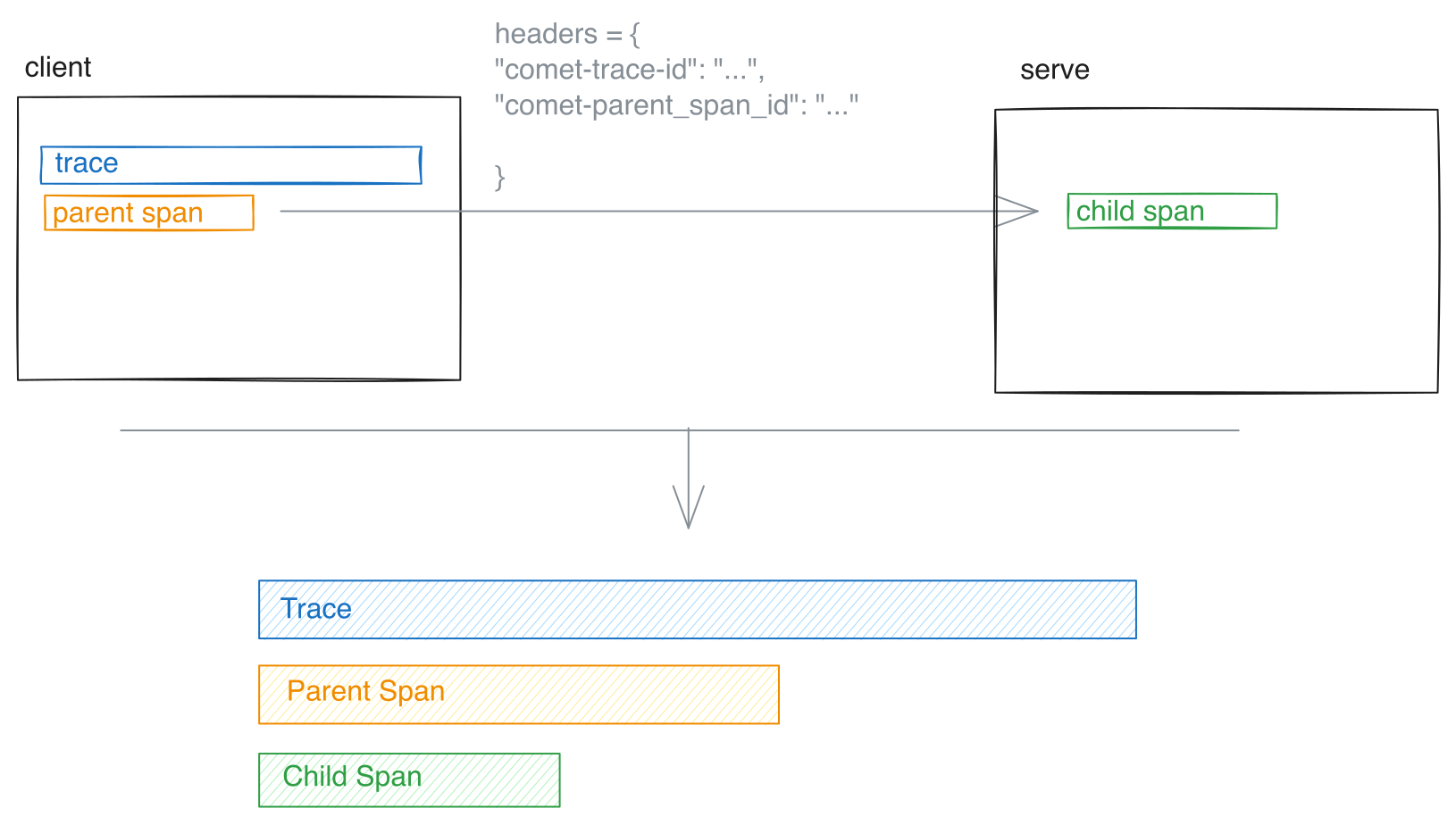
The Python SDK includes some helper functions to make it easier to fetch headers in the client and ingest them in the server:
from opik import track, opik_context

@track()
def my_client_function(prompt: str) -> str:
    headers = {}

    # Update the headers to include Opik Trace ID and Span ID
    headers.update(opik_context.get_distributed_trace_headers())

    # Make call to backend service
    response = requests.post("http://.../generate_response", headers=headers, json={"prompt": prompt})
    return response.json()
On the server side, you can pass the headers to your decorated function:
from opik import track
from fastapi import FastAPI, Request

@track()
def my_llm_application():
    pass

app = FastAPI()  # Or Flask, Django, or any other framework


@app.post("/generate_response")
def generate_llm_response(request: Request) -> str:
return my_llm_application(opik_distributed_trace_headers=request.headers)Using the distributed_headers Context Manager
Section titled “Using the distributed_headers Context Manager”As an alternative to passing opik_distributed_trace_headers as a parameter, you can use the distributed_headers() context manager for more explicit control over distributed header handling. This approach provides automatic cleanup, error handling, and optional data flushing.
from opik import track
from opik.decorator.context_manager import distributed_headers
from fastapi import FastAPI, Request

@track()
def my_llm_application():
    pass

app = FastAPI()  # Or Flask, Django, or any other framework


@app.post("/generate_response")
def generate_llm_response(request: Request) -> str:
    # Extract distributed headers from the request
    headers = {
        "opik_trace_id": request.headers.get("opik_trace_id"),
        "opik_parent_span_id": request.headers.get("opik_parent_span_id"),
    }

    # Use the context manager to handle distributed headers
    with distributed_headers(headers, flush=False):
        result = my_llm_application()

    return result
The distributed_headers() context manager accepts two parameters:
headers: A dictionary containing the distributed trace headers (opik_trace_idandopik_parent_span_id)flush(optional): Whether to flush the Opik client data after the root span is processed. Defaults toFalse. Set toTrueif you want to ensure immediate data transmission.
For more details and additional examples, see the distributed_headers context manager API reference.
Distributed Traces with a Remote Service Using OpenTelemetry
Section titled “Distributed Traces with a Remote Service Using OpenTelemetry”When the downstream service is instrumented with the standard OpenTelemetry SDK (rather than the Opik SDK), Opik provides helpers to bridge the two systems so the OTel span produced by the remote service still appears under the correct Opik trace and parent span.
The bridge works through two HTTP headers carried from the client to the remote service:
opik_trace_id— the Opik trace the OTel span should be attached to.opik_parent_span_id— the Opik span to use as the parent (optional).
On the receiving side, the helper translates these headers into two OpenTelemetry span attributes (opik.trace_id, opik.parent_span_id) recognized by the Opik OTLP ingest endpoint. Both values must be valid UUIDs; blank or malformed values are dropped with a warning so a misconfigured caller never silently corrupts the parent linkage.
Client: emitting distributed-trace headers
Section titled “Client: emitting distributed-trace headers”import requests
from opik import opik_context, track
@track()
def my_client_function(prompt: str) -> str:
headers = {
# Adds 'opik_trace_id' and 'opik_parent_span_id'
**opik_context.get_distributed_trace_headers(),
}
response = requests.post(
"http://.../generate_response",
headers=headers,
json={"prompt": prompt},
)
return response.json()import { getDistributedTraceHeaders, track } from "opik";
const myClientFunction = track(
{ name: "client" },
async (prompt: string) => {
const response = await fetch("http://.../generate_response", {
method: "POST",
headers: {
"Content-Type": "application/json",
// Adds 'opik_trace_id' and 'opik_parent_span_id'.
// Returns null outside of a track() context.
...(getDistributedTraceHeaders() ?? {}),
},
body: JSON.stringify({ prompt }),
});
return response.json();
}
);Remote service: attaching the headers to an OpenTelemetry span
Section titled “Remote service: attaching the headers to an OpenTelemetry span”The remote service creates a span with the OpenTelemetry SDK as usual and then calls the Opik bridging helper with the incoming HTTP headers. The helper sets the opik.trace_id / opik.parent_span_id / opik.span_id attributes on the boundary span only.
To make sure descendant OpenTelemetry spans (children created inside the boundary span via start_as_current_span / tracer.startSpan) also land under the original Opik trace and parent, register the OpikSpanProcessor on the same TracerProvider as your OTLP exporter. Without it, only the boundary span is linked and its descendants are orphaned in a synthetic Opik trace.
In Python, OpikSpanProcessor ships with the main opik package under opik.integrations.otel. In TypeScript it lives in a separate opik-otel package — install it alongside opik (npm install opik-otel @opentelemetry/api @opentelemetry/sdk-trace-base).
from fastapi import FastAPI, Request
from opentelemetry import trace
from opentelemetry.sdk.trace import TracerProvider
from opentelemetry.sdk.trace.export import BatchSpanProcessor
from opentelemetry.exporter.otlp.proto.http.trace_exporter import OTLPSpanExporter
from opik.integrations.otel import OpikSpanProcessor, distributed_trace

# Configure the tracer provider with the OTLP exporter that ships spans to Opik
provider = TracerProvider()
provider.add_span_processor(BatchSpanProcessor(OTLPSpanExporter()))

# Register OpikSpanProcessor so descendants of the boundary span inherit
# opik.trace_id / opik.parent_span_id automatically.
provider.add_span_processor(OpikSpanProcessor())
trace.set_tracer_provider(provider)

app = FastAPI()
tracer = trace.get_tracer("my-service")


@app.post("/generate_response")
def generate_response(request: Request) -> str:
    with tracer.start_as_current_span("server-span") as span:
        # Reads opik_trace_id / opik_parent_span_id from the request headers
        # and sets the corresponding OTel span attributes on the boundary span.
        distributed_trace.attach_to_parent(span, dict(request.headers))

        # Any descendants are picked up automatically by OpikSpanProcessor.
        with tracer.start_as_current_span("child-span"):
            # ... handle the request, set additional span attributes ...
            pass
return "ok"import http from "node:http";
import { context, trace } from "@opentelemetry/api";
import {
BasicTracerProvider,
BatchSpanProcessor,
} from "@opentelemetry/sdk-trace-base";
import { OTLPTraceExporter } from "@opentelemetry/exporter-trace-otlp-http";
import { attachToParent, OpikSpanProcessor } from "opik-otel";
// Configure the tracer provider with the OTLP exporter that ships spans to Opik.
// OpikSpanProcessor must be registered before the exporter so the opik.* attributes
// it sets at span start are visible at export time.
const provider = new BasicTracerProvider({
spanProcessors: [
new OpikSpanProcessor(),
new BatchSpanProcessor(new OTLPTraceExporter()),
],
});
provider.register();
const tracer = trace.getTracer("my-service");
const server = http.createServer((req, res) => {
const boundary = tracer.startSpan("server-span");
// Reads opik_trace_id / opik_parent_span_id from req.headers
// and sets the corresponding OTel span attributes on the boundary span.
attachToParent(boundary, req.headers);
// Set the boundary as the active parent so child spans inherit its OTel
// context — this is what lets OpikSpanProcessor see the boundary's
// opik.trace_id / opik.span_id when the child starts. Plain
// `tracer.startSpan("child")` would otherwise create an orphan root span.
const parentCtx = trace.setSpan(context.active(), boundary);
const child = tracer.startSpan("child-span", {}, parentCtx);
// ... handle the request, set additional span attributes ...
child.end();
boundary.end();
res.end("ok");
});The remote service must be configured with an OTLP exporter pointing at the Opik backend (/v1/private/otel/v1/traces). See the OpenTelemetry Python SDK integration guide for a full exporter configuration example; the same endpoint is used by the OpenTelemetry JS/Node SDK.